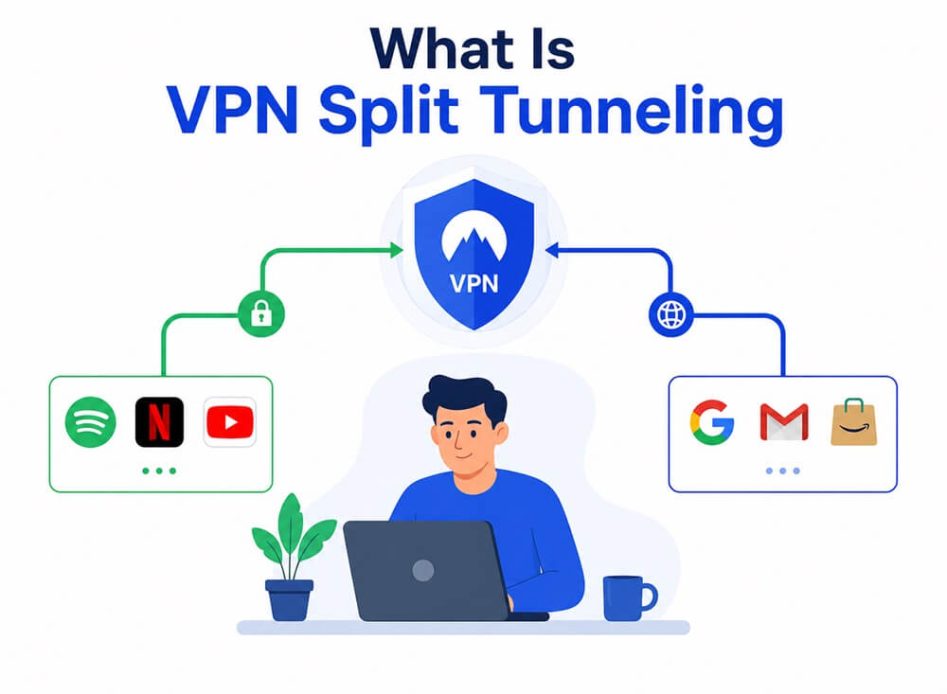
Split tunneling lets you pick which apps use the VPN and which do not, making it easy to tailor your security and speed. While searching for the best VPN for Windows, you may often see the term “split tunneling” as a VPN feature. Confusing at first, it is an easy-to-understand VPN term. Split tunneling in a VPN is a feature that routes your internet traffic through two paths: apps and websites pass through a secure, encrypted VPN connection on one path, while the other path connects them directly to the internet.
Picture a road with separate lanes for heavy vehicles and light vehicles. They reach the same destination but through different lanes to avoid crashing into each other, chaos, and road jams. Split tunneling is somewhat similar. All applications and websites connect to the internet. However, some apps and websites go through the VPN server, while others connect directly, bypassing it. The difference is that you cannot choose the vehicle’s lane on the road, but you can choose which websites and apps move through the VPN and which do not.
To understand split tunneling in a VPN in more detail, continue reading.
What Is a VPN Split Tunneling
VPN split tunneling is a feature that lets you choose which applications or websites move through your encrypted VPN tunnel and which ones connect to the internet directly.
For example, you can choose a VPN for sensitive activities such as accessing your bank account while skipping it for everyday tasks, such as online gaming.
When you encrypt only selected apps, it is split tunneling, and when you route all your internet traffic via the encrypted VPN server, it is a full tunnel VPN.
Split tunnel VPN vs full tunnel
Split tunneling in a VPN protects chosen applications, while a full-tunnel VPN encrypts all traffic for comprehensive protection. While a split tunnel VPN improves speed and performance for everyday low-risk functions, a full tunnel VPN may slow down high-bandwidth tasks, such as gaming or streaming. Moreover, a full-tunnel VPN is the best for sensitive situations, travel, and public WiFi. On the other hand, split tunneling offers flexibility and is best for speed-heavy activities and everyday browsing.
What Is a VPN Split Tunneling Used For
You can use split tunneling to help apps run at maximum speed, have greater online control, sync all devices on your home network, and use two IP addresses simultaneously.
- VPN connections may cause a minor speed drop, which can sometimes interfere with activities such as video streaming or gaming. You can use split tunneling in a VPN to exclude such apps from encryption to help them run faster.
- A VPN can interfere with your device’s connection with wireless local devices, such as a printer. Split tunneling ensures you can sync all your home network devices, while offering a secure connection whenever you need it.
- You can use split tunneling in a VPN to control your internet traffic better. It allows you to encrypt your crucial, sensitive information while allowing the other traffic to skip VPN protection. For example, you can use a VPN for all your work-related tasks or to access your corporate network while bypassing the VPN protection for your personal traffic.
- A VPN hides you online by changing your IP address to a VPN server’s IP address. You can use split tunneling to access local content in some applications using your actual IP address while staying hidden in other applications.
Hence, with split tunneling, you can use two paths, i.e., one with and one without a VPN simultaneously, getting the best of both worlds.
Also know: Best Free VPN for Hulu
How Does Split Tunneling Work
Split tunneling works by dividing your device’s traffic into two streams when you enable it on the VPN. Here is how it happens.
- Traffic encryption: Your VPN encrypts the traffic you want to send through the secure VPN tunnel.
- VPN server connection: Apps and websites routed via the VPN connect to the internet through a VPN server, so they see the VPN server’s virtual location and IP address.
- Apps bypassing the VPN: You choose which apps skip the VPN using split tunneling.
- Traffic split: Traffic from chosen apps uses your IP address and goes directly through your internet service provider, bypassing the VPN tunnel.
Depending on the type of split tunneling in a VPN, sometimes the above process can work in reverse. If that happens, first you select which applications and services use the VPN, and then other apps and services connect to the internet using your regular connection.
What Are the Types of Split Tunneling in VPN
Application-based split tunneling, inverse split tunneling, and IP or URL-based split tunneling are the three types of VPN split tunneling. Application-based split tunneling lets you split your internet traffic by choosing apps and services that use and those that do not use the encrypted VPN tunnel. Inverse split tunneling allows you to decide which apps and services bypass the VPN, while others default to the VPN tunnel. IP- or URL-based split tunneling routes traffic depending on domains, website addresses, or network destinations that you choose.
Application-based split tunneling
Application-based split tunneling leaves some apps unaffected by the VPN. With this type of split tunneling, you can select the apps or services that pass through the VPN and which do not pass through it, i.e, which use your regular internet connection.
For example, you can choose to stream videos at full speed through the regular internet connection, while ensuring sensitive files on your corporate network move through the secure VPN tunnel.
Inverse split tunneling
Popular with Zero Trust architectures that assume all traffic should be VPN protected unless specifically excluded, inverse split tunneling, also known as split-include, allows you to choose what bypasses the VPN, while all other things default to the secure VPN connection.
IP or URL-based split tunneling
URL- or IP-based split tunneling separates traffic based on domains, network destinations, or website addresses that you choose. Commonly used in corporate environments, if you use this type of split tunneling for a specific page, your normal browsing remains protected by the VPN, and your activities on that designated page are transmitted over the internet directly.
While powerful, split tunneling can expose sensitive data or create security gaps if not configured correctly. Hence, it is a smart idea to learn whether it is good or bad for you, considering its benefits and risks.
Is VPN Split Tunneling Good or Bad
Though split tunneling in a VPN can improve your internet speed and allow access to more than one network simultaneously, it can also leak your data or connect to an unsafe network if the wrong app skips the VPN. Hence, consider the benefits and risks of split tunneling before enabling it.
Benefits
- Besides fast internet and multiple networks, split tunneling helps reduce strain on the CPU.
- It helps reduce latency.
- You can bypass unnecessary bandwidth bottlenecks.
- Split tunneling allows easy connection with printers, smart home devices, or TVs on your home network.
- It lets you access services and websites available only in your local country with your real IP address, while securing everything else with the VPN.
- With split tunneling, you can easily access websites with VPN blocks.
- When traveling abroad, split tunneling secures your work and personal information by routing it via the VPN, while allowing access to local websites and services.
Risks
- It may expose some of your online activities to hackers.
- Setting up the right split tunneling permissions is time-consuming.
- With split tunneling, you bypass security measures, such as proxy servers, which ensure traffic security.
- It may risk the security of your corporate system if your employee uses a less secure network.
Despite these risks, split tunneling is a highly useful VPN feature that keeps your sensitive data secure without compromising your internet speed.
Also know: 5 Best VPN for Binance
How to Use Split Tunneling in a VPN
To use split tunneling in your VPN, you generally need to open your VPN app or client, navigate to the settings, look for the split tunneling option, and choose which applications or websites will use the VPN connection and which will not. These steps are similar across most major VPN providers, though there may be slight variations depending on your VPN and device. For the most accurate instructions, check your VPN provider’s help or support section for device-specific guides. Below is an example of how to enable split tunneling using NordVPN.
- Open your VPN application.
- Navigate to the VPN settings and then choose Split tunneling.
- Toggle on Split tunneling and then select the connection type you want.
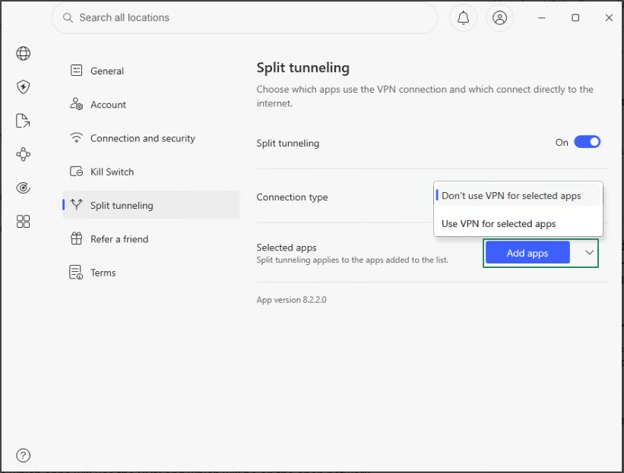
- Lastly, select which applications will use the VPN and which will use the open network.
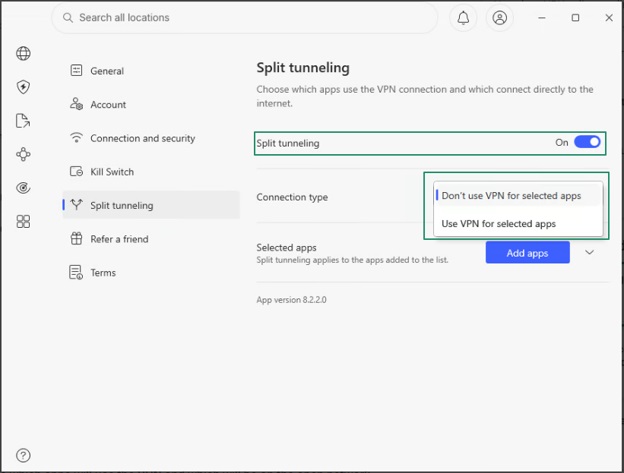
If you wish to stop split tunneling, toggle off the split tunneling option in the VPN settings.
It is also notable here that not all VPNs support split tunneling. Some of the best VPN providers with split tunneling are NordVPN, Surfshark, PureVPN, ExpressVPN, PrivadoVPN, and Proton VPN.
How to Choose the Best Split Tunneling VPN
To choose the best VPN for split tunneling, consider device compatibility, security, connection speeds, ability to access streaming services, ease of use, and availability of helpful customer support.
Moreover, even if you have the most secure VPN, some effective tips can help you use split tunneling with the utmost safety.
How to Use Split Tunneling Safely
Always keep sensitive apps protected, use inverse split tunneling when available, exclude only low-risk traffic from the VPN, ensure simple split-tunnel rules, review the configuration regularly, protect important accounts with multi-factor authentication, use a comprehensive security solution, keep everything updated, and use unique, strong passwords to use split tunneling safely.
- Never exclude sensitive applications, such as banking apps, from VPN protection.
- Whenever possible, use inverse split tunneling, i.e., specify the few applications, such as gaming and streaming apps, that can bypass the VPN.
- Exclude only low-risk traffic, such as online gaming and music or entertainment streaming, from your VPN.
- Ensure your split-tunnel rules are not complex, as the more complex the rules, the greater the chances of making a mistake.
- Set a reminder to review your split tunnel rules at least quarterly to check if the apps you have excluded from the VPN are correct.
- Ensure your VPN is fully updated, and use DNS leak test tools to verify the split tunneling configuration periodically.
- Use multi-factor authentication on all your important accounts to prevent hackers from intercepting your credentials.
- Ensure you use comprehensive, modern security software that detects malware that tries to exploit your split-tunnel configuration.
- Turn on automatic updates for your VPN client, operating system, and all applications.
- Use unique and strong passwords managed by the best password manager to reduce the damage if your credentials get exposed because of a VPN vulnerability.
Hope this helps you use split tunneling confidently. If you have any questions, you can find their answers in the commonly asked questions below.
Frequently Asked Questions
Q1. Should I use split tunneling on my VPN?
Yes, you should use split tunneling to optimize your internet speed and access local devices while encrypting specific data.
Q2. Which VPN has the best split tunneling?
Spit tunneling is a rare feature. VPNs like NordVPN, Surfshark, PureVPN, ExpressVPN, PrivadoVPN, and Proton VPN are the best VPNs for split tunneling.
Q3. How do I know if my VPN is split tunneling?
To know if your VPN is split tunneling, connect to the VPN, open your browser, and then search “what is my IP” on Google. If the result displays an IP address or location different from your real physical location, the VPN protects your primary traffic. Next, test the website or application you want to use without the VPN. If this application or website loads normally without location restrictions or displays your actual IP address, split tunneling is working.
Q4. Can I choose the traffic going through a VPN split tunnel?
Yes, you can choose to route some of your device traffic or applications via an encrypted VPN, while other devices or applications connect to the internet directly.
Q5. Can I use split tunneling and a kill switch simultaneously?
Most VPNs allow you to use split tunneling and a kill switch at the same time. The VPN kill switch suspends your internet connection whenever the VPN connection drops. When you use the kill switch with split tunneling, it will disrupt the internet connection of only those applications and websites that are not included in the split tunneling feature. However, there are also some VPNs that do not allow simultaneous split tunneling and kill switch.
Hope this clears up any confusion about split tunneling. To recap what is a VPN split tunneling, it is a feature that allows you to choose whether you want to use or bypass the secure VPN connection for some applications and websites. If you have any persisting doubts about split tunneling in VPN, feel free to reach out to us in the comments section.