PrivadoVPN is recognized as one of the fastest and most secure VPNs. But how does it compare to other industry leaders like NordVPN and ExpressVPN? While NordVPN is known for its large server network and advanced security features, and ExpressVPN stands out for its consistent performance and excellent customer support, PrivadoVPN aims to offer strong speed and privacy, especially appealing to users looking for a budget-friendly option. However, is this Switzerland-based Virtual Private Network really the best VPN for Windows? Let’s answer this and more questions in this genuine PrivadoVPN review.
To begin with, a VPN or Virtual Private Network masks the user’s identity to help them browse all their heart’s content privately and securely, without any geographical or other restrictions. It does this by routing your internet traffic through a server located at some remote location.
With servers in the most challenging locations like Brazil (physical servers only and not virtual servers), PrivadoVPN appears to be a fast, safe, and secure way to browse the internet and unblock websites restricted in your region. However, is it worth it?
To cut short, PrivadoVPN is great for streaming, has all essential security features, has a strict no-logging policy, and is available for free. Though its server network is relatively smaller than other top VPNs, it tends to lag while gaming due to high ping and occasional dropped connections, which can impact your online gaming experience. However, it is still a decent pick if you are on a budget.
To learn more about this VPN and its complete review, continue reading.
What Is PrivadoVPN: An Overview
Developed by Privado Networks AG, a Swiss company, PrivadoVPN is quite a young VPN with strong privacy laws. This lightweight VPN service is known for bypassing geo-restrictions to ensure uninterrupted streaming. With over 231 global server locations (4 of them available in the free plan), such as servers in Europe, Asia, North America, and several other regions, PrivadoVPN is one of the best VPNs for gaming and unrestricted streaming.
Moreover, PrivadoVPN packs many helpful features, such as an ad and malware blocker, split tunneling that lets you decide which apps can and cannot use the VPN, Control Tower for DNS-based threat management, and more features in a user-friendly interface. Let’s have a detailed look at all these features.
What Are the Key Features of PrivadoVPN
While PrivadoVPN does not have a lot of advanced features, its feature set ticks all the right boxes when it comes to protecting user privacy. Here are all its features to help you decide whether or not this is the VPN you want to use.
Zero-log policy
PrivadoVPN does not store any information related to your online activities. Following a strict no-log policy, it also does not collect your IP address to ensure the confidentiality of your online activities. Additionally, it makes legal disclosures if it receives any request to access your data.
End-to-end encryption
PrivadoVPN protects your data with strong AES-256-GCM encryption. It is the same standard that the NSA recommends to secure classified information, and banks, cybersecurity agencies, and governments use globally.
Kill switch
Like all the best VPNs, PrivadoVPN has a kill switch. It cuts your internet traffic if your VPN disconnects or the VPN connection is unstable. Imagine you are working from a cafe while being connected to a public WiFi, the VPN connection drops, and all your private data is exposed. A kill switch is your savior in such situations when other users can monitor your traffic. Luckily, during our PrivadoVPN review tests, we found the kill switch working perfectly.
Secure encryption protocols
PrivadoVPN uses WireGuard, OpenVPN (TCP/UDP), and IKEv2/IPSec VPN protocols. The WireGuard protocol balances speed and security; we found it to be faster than OpenVPN. The OpenVPN protocol is best for privacy as it uses the highest level of encryption, but it is slower than the WireGuard and IKEv2 protocols. IKEv2 or IPSec protocols offer the fastest connection speeds and can handle frequent reconnections between mobile data and WiFi well. PrivadoVPN automatically selects the VPN protocol for your device and also allows you to choose one manually.
Split tunneling
Split tunneling or SmartRoute in PrivadoVPN lets you choose the apps that use your default internet connection, bypassing the VPN. This helps when you are working with a latency-sensitive app where privacy is not one of your top priorities.
SOCKS5 proxy
The SOCKS5 proxy option in PrivadoVPN helps with torrenting. It ensures safe and anonymous file transfers while ensuring fast download speed and IP address security. To make the most of this feature, enter the authentication information separately into the P2P client.
Control Tower
Control Tower is the ad and malware blocker in PrivadoVPN. It has many options for blocking annoying pop-ups, adult or inappropriate content, social media applications, and more. It is a comprehensive feature with three adjustable categories: Threats, Social, and Family Security.
The Threats category blocks phishing sites and malware distributors; the other two categories are especially helpful in making the internet a safe place for children by blocking content not appropriate for them. Without disturbing you, the Control Tower in PrivadoVPN functions in the background, and you can enable or disable it from within the app.
That was all for the core features of PrivadoVPN. Let’s now list the pros and cons of this VPN we noted during our PrivadoVPN review tests.
Also know: Best Free VPN for Spotify
PrivadoVPN Pros and Cons
Every VPN has both benefits and drawbacks. Here’s the fair share of pros and cons of PrivadoVPN to help you decide whether you are comfortable with it.
Pros
- Works with almost all streaming platforms, including Hulu, Netflix, Amazon Prime Video, BBC iPlayer, Max, and Disney+.
- Many VPNs slow down on distant servers; PrivadoVPN offers a decent speed on distant servers and is fast on nearby servers.
- PrivadoVPN app is lightweight and user-friendly and is available on almost all devices, including macOS, FireTV, iOS, Roku, AndroidTV, and more.
- A generous 10GB of data per month without speed limits in the free plan.
- Allows up to 10 simultaneous connections.
Cons
- It has all the essential features but lacks advanced options such as dark web monitoring that some premium VPNs like Nord offer.
- While PrivadoVPN offers customer support via live chat, a knowledge base, and a ticket system, the knowledge base articles are only basic and largely promotional, and the live chat customer support also does not provide quick and helpful solutions to user problems.
- PrivadoVPN’s extremely high ping rates make it an unreliable option for online gaming.
If you are comfortable with PrivadoVPN’s nuances, here is how to use it.
How to Use PrivadoVPN
You can follow the steps below to use PrivadoVPN.
- Go to the PrivadoVPN website.
- Click the Software tab and then click PrivadoVPN for your operating system.
- Click the Download
- Next, wait for the .exe file to be saved to the downloads folder of your browser.
- Double-click the .exe file to start the installation.
- Click Yes to proceed to the next step.
- Click Install to install the PrivadoVPN app.
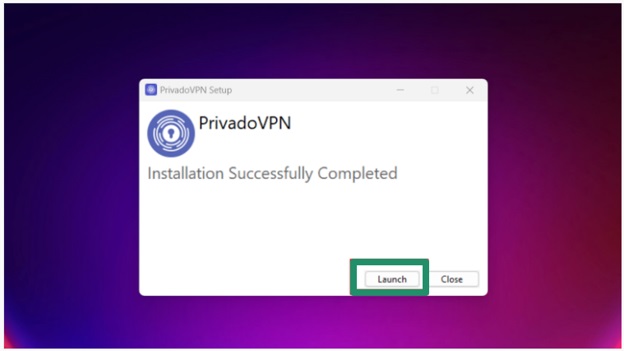
- After completing the installation, click Launch to open the VPN app.
- Click Sign Up to create a new VPN account. If you already have an account, click Log In and then sign in with your credentials.
- After logging in, click on the Click to Connect button to connect automatically to the closest and fastest server.
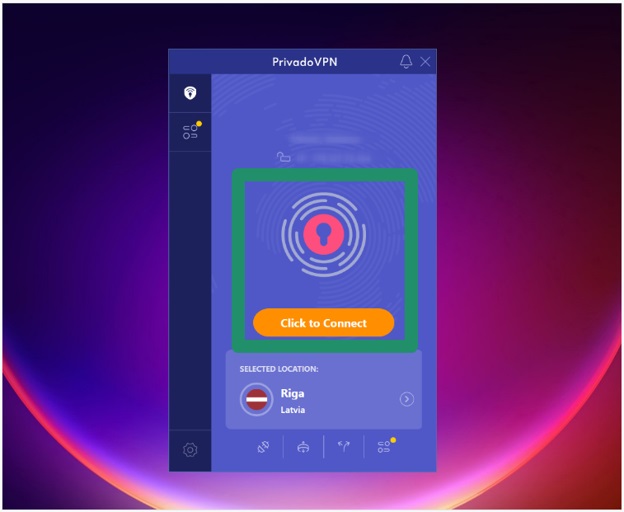
- To choose a server manually, click Selected Location, choose your preferred server, and click The Privado tray icon will become green to indicate an active VPN connection. To verify the connection, you can refresh the Privado website and check the new location and status in the address bar at the top.
Quite an easy-to-use VPN service, PrivadoVPN comes in both free and paid versions. We suggest starting with the free VPN, unless you need streaming support, to test its features and then upgrading to the paid plans if you like it. Here is how much the paid plan will cost.
How Much Does PrivadoVPN Cost
Apart from a free version, PrivadoVPN has three paid plans, each with a 30-day money-back guarantee. The 24-month unlimited VPN is priced at $1.11/month. The 12-month unlimited VPN is priced at $1.33/month. The 1-month plan is priced at $10.99/month.
In the free plan, you get 10 GB of data. The paid plans allow unlimited data transfer. Also note that the free PrivadoVPN does not support streaming; it is only supported in the paid plans. Moreover, the free plan gives you access to 13 global servers and allows only 1 connection. The paid plans allow access to over 60 servers and 10 simultaneous connections.
As for payment mode, it allows you to pay through all major credit cards, PayPal, and cryptocurrency, including Ethereum, Bitcoin, Tether, Monero, and Doge. You can also add an antivirus as an add-on for $1.99/month, though top VPNs like Nord include it by default in their base plan.
We found PrivadoVPN’s pricing quite affordable. However, like many other top-tier VPNs, it should offer longer subscriptions at discounted rates. Though this is what they should consider in future updates, no discounts are not really a deal breaker. PrivadoVPN is still one of the best budget VPNs. Let’s answer a few commonly asked questions about this VPN service to clear any confusion you may have.
Also know: Best Free VPN for Hulu
Frequently Asked Questions
Q1. Is PrivadoVPN safe to use?
Yes, PrivadoVPN is safe to use, with no security concerns reported so far. It is bound by Switzerland’s strict laws to ensure it remains trustworthy. It follows a strict no-logs policy that ensures none of your information is recorded. However, it should consider an independent audit to back these claims so no doubt remains in the future.
Q2. Does PrivadoVPN sell your data?
PrivadoVPN does not keep any logs of your online activities and does not sell user data to protect your privacy.
Q3. Does PrivadoVPN work with Netflix?
On the paid plans, PrivadoVPN offers streaming support and works on Netflix, allowing you to stream your favorite shows or movies.
Q4. What is the alternative to PrivadoVPN?
NordVPN, ExpressVPN, and Private Internet Access are some of the best PrivadoVPN alternatives. If you are looking for a free option, the best free PrivadoVPN alternatives are Proton VPN, Windscribe, and TunnelBear.
Hope that helps you make an informed move about PrivadoVPN. To conclude our PrivadoVPN review, it is the right choice if you are a new VPN user (who may not need many advanced features), like minimalist applications, want a fast VPN, or are searching for a cheap yet effective VPN. If any of your questions remain unanswered, feel free to write us a comment.