VPN, or Virtual Private Network, is a crucial tool for digital protection and security. It hides your IP address, geographic location, and personal information from hackers, meddlers, and other third parties. While many VPNs are available, Surfshark VPN holds a strong position among the best VPNs. However, is it really the best VPN? This honest Surfshark VPN review helps you understand this VPN to make an informed decision about whether to use it.
In short, Surfshark is an excellent VPN for beginners. Its application is easy to use with essential privacy features and unblocking capabilities at an appealing price; Surfshark’s price for the base plan is as low as $3.39/month for 12 months with a 7-day free trial. However, advanced users may miss the powerful customization found in high-end VPNs. Also, if you are searching for a VPN for streaming, Surfshark’s ad-blocker may interfere with some streaming websites, though Surfshark works well as a VPN for gaming on local servers because of its low ping.
For more details on the Surfshark VPN, continue reading this review with Surfshark VPN features, pros, and cons.
What Are the Key Features of Surfshark VPN
A large server network, two-factor authentication, tracking blocker, availability on unlimited devices, ad-blocking, a no-log policy, powerful encryption, anti-malware and anti-phishing agent, VPN bypassing (split tunneling), kill switch, camouflage mode, IP rotator, and MultiHop option are the key Surfshark VPN features. Here is a detailed look at these features.
Two-factor authentication
One of the best features to talk about in this review of Surfshark VPN is the two-factor authentication it offers for privacy. With two-factor authentication in place, it is extremely challenging for any meddler or hacker to access your data.
Tracker blocking
Surfshark VPN prevents and blocks all third-party tracking cookies. It ensures anonymity at all times by blocking hackers or other third parties from accessing your data, in addition to securing your IP address.
Availability on unlimited devices
Worth mentioning in this Surfshark VPN review, you can download and use this VPN on unlimited devices. Unlike other VPNs that impose a device limit with the paid subscription, Surfshark VPN lets you use the VPN on all your devices with a single subscription.
Ad-blocking
Surfshark VPN offers a strong ad-blocker to block ads from various websites and scammers for a smooth surfing experience.
A large server network
With Surfshark VPN, you can access over 4,500 servers across 100 countries on 6 continents. Such a fast and worldwide server network ensures easy access to desired content from any country or location.
No-log policy
Surfshark VPN does not log your activities. It does not read and save your data, ensuring complete privacy while browsing.
Powerful encryption
Surfshark VPN protects your data with a strong AES 256-bit GCM encryption. It is the same level of encryption governments and militaries use to protect private data and online activities from being revealed to your ISP or other third parties.
Anti-malware and anti-phishing
Malware and phishing attempts can degrade the performance of your device and may expose your sensitive information to scammers and hackers. Surfshark VPN has an anti-malware and anti-phishing agent to block all malware attacks and phishing attempts for real-time security.
VPN bypassing (split tunneling)
Some apps like food and grocery apps and banking apps may not work with a VPN. Hence, the top VPNs like Surfshark allow you to bypass the VPN connection for some applications. This feature is called a bypasser in Surfshark and split tunneling in general. When enabled, it allows selected applications to use your native internet connection for smoother and better internet surfing. It also helps you use your in-house devices, such as printers and scanners, wirelessly, hassle-free.
Kill switch
A kill switch is a crucial VPN feature. It disconnects you from the internet when your VPN turns off unexpectedly. This feature prevents your data from being exposed to hackers and other meddlers.
Camouflage Mode
Camouflage mode is a key Surfshark VPN feature to mention in this review. It makes users completely anonymous, hiding you even from your internet service provider.
IP rotator
The IP rotator in Surfshark changes or rotates your VPN server’s IP address at regular intervals, without affecting internet connectivity and securing you from third-party threats.
MultiHop option
Another notable feature within the review of Surfshark VPN is the 30-day MultiHop option. This feature allows you to use two different locations and servers to hide your IP address and other information. Choosing two locations ensures better and harder-to-trace internet connectivity.
While the Surfshark VPN features look promising, the pros and cons that we noted while reviewing it further clear the picture about whether it is the right choice for you.
Also know: Complete Review of PrivadoVPN
What Are the Surfshark VPN Pros and Cons
The following pros and cons of Surfshark VPN software will help you decide whether to use it or not.
Pros
- Fast speed; only a 15 to 30% speed drop
- Unlimited bandwidth
- Affordable price
- Audited, strict no-logs policy; the most recent audit conducted in November 2025
- Unblocks almost all major OTT platforms, including Netflix
- Beginner-friendly, attractive user interface
- Offers a temporary email address and virtual US phone number for account sign-ups and newsletter subscriptions
- Improved stability with FastTrack route optimization and 100 Gbps servers in the Netherlands
- Supports WireGuard, OpenVPN UDP, OpenVPN TCP, and IKEv2 protocols.
Cons
- Netherlands, where Surfshark is based, is part of the Nine Eyes alliance; the government can make Surfshark disclose user data in certain situations
- Ad-blocker sometimes interferes with streaming websites
- No free version is available
- Limited feature access in the trial period
- Occasional low download speed
- Kill switch sometimes fails under pressure
After noting the pros and cons of Surfshark VPN, let’s look at the pricing structure of the VPN service.
What Is the Surfshark VPN Price
Surfshark is quite affordably priced. You can select from a three-tier structure and use the software on unlimited devices on any operating system.
The monthly plan of the software is priced at $16.45/month, which is billed monthly. For a better and more beneficial plan, you can select the yearly plan that is priced at $3.39/month for the first year (total $47.88). However, once the first year ends, you need to pay $50.85 to continue using the VPN.
Similarly, you can choose a two-year plan that is priced at $2.49/month for the first two years. Under each of these plans, you may need to pay taxes as applicable.
Every subscription also comes with a 30-day money-back guarantee if you decide Surfshark VPN is not for you; you can claim a refund within 30 days of signing up.
How to Use Surfshark VPN
If you have come to this point in the Surfshark VPN review, you may be satisfied with the VPN and must be wondering how to use it. You can follow the steps below to use this VPN software easily.
- Purchase the VPN software or sign up for the free trial on the official website.
- After the purchase is complete, download the software, then install and run it on your device.
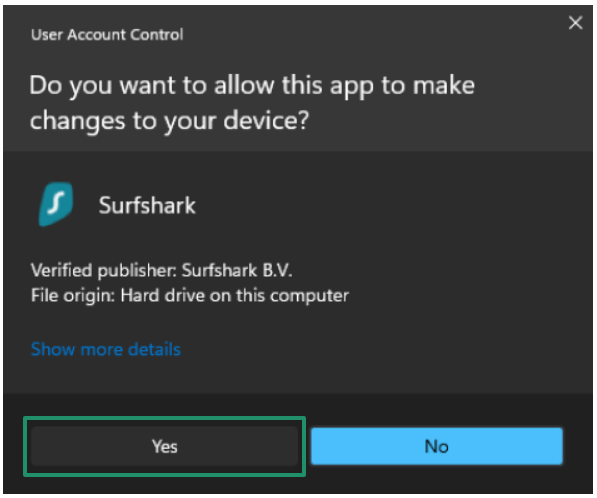
- Enter your account credentials in the VPN software and activate the key.
- After the key is accepted, go to the home screen.
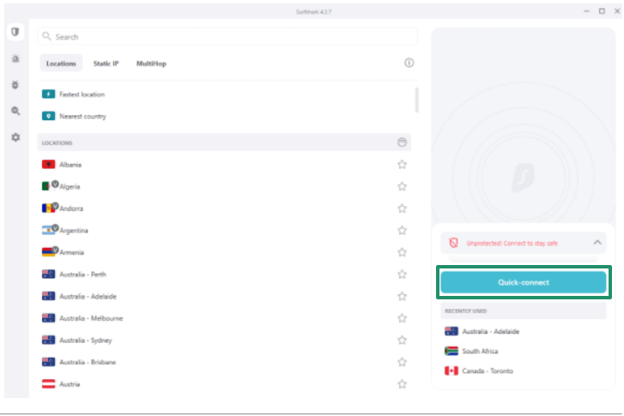
- Select the location you want to connect to and click the Connect button.
If you have any questions about this VPN, you can check the commonly asked questions below for answers.
Frequently Asked Questions
Q1. Is Surfshark a trustworthy VPN?
Yes, Surfshark is a trustworthy VPN because of its strict, audited no-logs policy and high privacy and security.
Q2. Is Surfshark good for streaming?
Yes, Surfshark is good for streaming. It successfully unblocks streaming services like Netflix, Disney+, Hulu, BBC iPlayer, and Amazon Prime Video with minimal buffering. Though its ad blocker can sometimes interfere with streaming, it is a rare issue.
Q3. Which country owns Surfshark?
Surfshark is based in the Netherlands. Established in 2018, Surfshark moved its headquarters to the Netherlands on October 1, 2021.
Q4. Has Netflix blocked Surfshark?
While Surfshark worked fine with Netflix libraries in the UK, US, and Japan, some libraries may not load occasionally. If this happens, switch to another server. If the issue persists, contact Surfshark support to find the best location or setting for Netflix.
That sums up our review of Surfshark VPN. It is quite an amazing VPN to surf the internet safely and privately. If you have any persisting questions about this VPN, you can leave them in the comments.