

Macrium Reflect is a powerful backup and recovery solution designed to protect your Windows system, files, and partitions. Common uses include creating system images before making hardware changes, backing up personal data, managing workstation backups, making rescue media, cloning a smaller hard drive or SSD to a larger one, and quickly restoring your operating system to a previous state.
This backup and recovery software for home and business allows users to back up, restore, and migrate their Windows operating system, partitions, and files. With this software, you can protect your data by creating compressed images or exact copies of your hard drive, enabling fast and reliable system recovery even in the event of hardware failure.
Although still popular, the Macrium Reflect free download is no longer available. It is officially retired and discontinued, with no security updates being released after January 1, 2024. While those who have this free software downloaded on their systems can still use it, they will no longer be able to update it. If you are specifically looking for a free backup solution, there are alternative tools you can consider, such as AOMEI Backupper Standard and EaseUS Todo Backup Free.
If not, the paid, professional version of Macrium Reflect is still available with a 30-day free trial.
What Is the Current Version of Macrium Reflect
Macrium Reflect X is the latest official version of Macrium Reflect that has replaced the earlier Reflect 8 with significantly improved speed, native Windows Copilot+ ARM support, and resumable imaging.
- Latest Version: Reflect X
- Release Date: October 8, 2024
Macrium Reflect Free Download Link (30-Day Free Trial)
You can download the latest Macrium Reflect with a 30-day free trial from the link below.
Download Macrium Reflect Free 30-day trial
- After navigating to the link above, click Free 30-Day Trial.
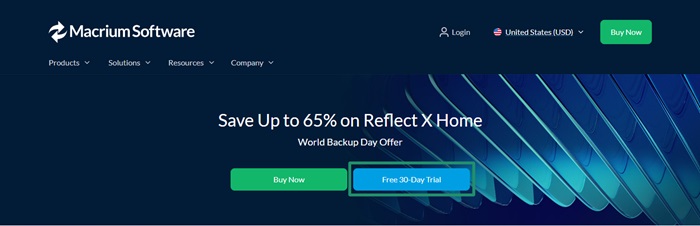
- Once you click on the Free 30-day trial, a download page appears on your screen.
- Create a Macrium account if you do not have one already (you can use the email used earlier if you have previously purchased Macrium software).
- After creating your Macrium account and logging in, you can follow the instructions that appear on your screen to complete the Macrium Reflect free download.
Once the software download and installation are complete, you can experience fast backup, imaging, and recovery, resumable imaging, tailored backups, system images, and other best features of the new Macrium Reflect backup and recovery software for Windows.
Why Download Macrium Reflect: Its Key Features
You can benefit from these top features of Macrium Reflect, i.e., one of the best software programs to perform backup and restore on Windows.
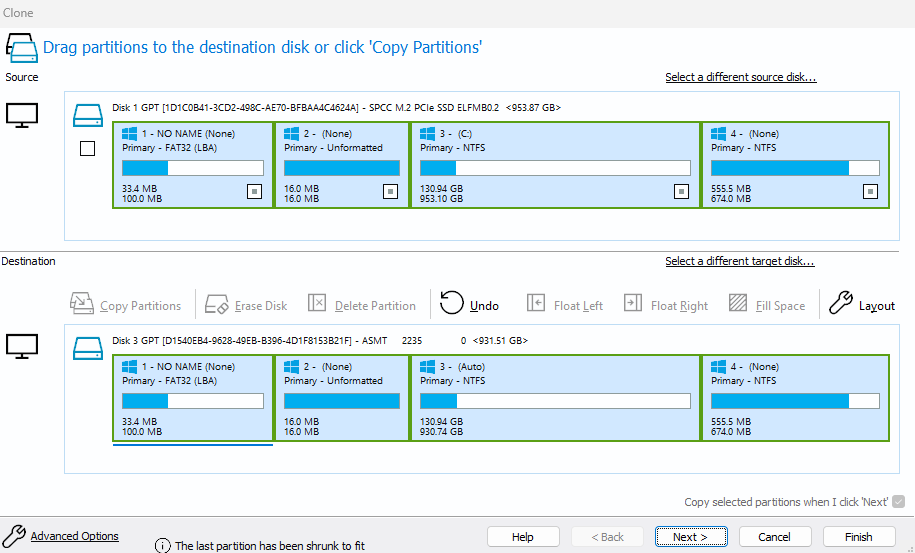
- Disk cloning and imaging: With Macrium Reflect, you can create a complete, incremental, and differential disk image. It allows you to back up your whole system, individual files and folders, and partitions efficiently. Moreover, this software lets you clone the disk for seamless data migration from one drive to another.
- Z-standard compression: A lossless data compression algorithm called Z-standard, and optimized multithreading processes enable fast backup and recovery. Moreover, Rapid Delta Restore technology decreases the restore time by restoring only the disk image difference, resulting in a faster system recovery.
- Bootable rescue media creation: Macrium Reflect offers bootable rescue media creation tools on CDs, DVDs, or USB drives. It enables you to recover your systems even if your primary operating system becomes unbootable.
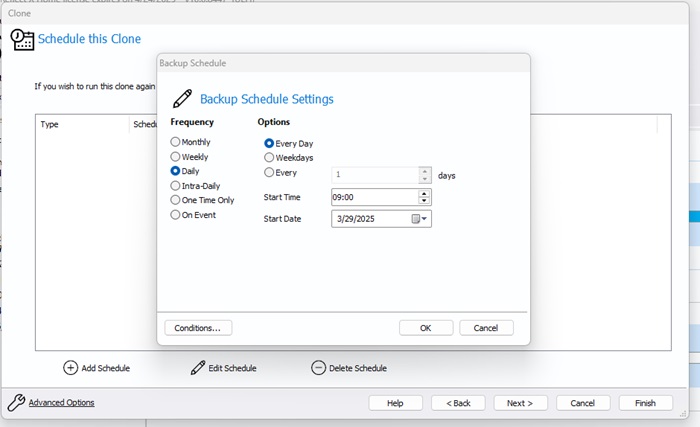
- Backup scheduling: You can schedule backups to automate them according to your requirements. The software also offers Windows Task Scheduler integration for easy automation.
However, whether you should download or not download the Macrium Reflect free trial also depends on the pros and cons of this software.
Also know: Download and configure the Office Customization Tool in Windows
Should You Download Macrium Reflect? Its Pros and Cons
Although Macrium Reflect offers several strong features, the advantages and disadvantages that we noted are also worth considering while downloading the software.
Pros
- Easy-to-use interface
- Helpful and responsive customer support
- A strong WinPE-based recovery environment
- Encrypted backups to ensure security
Cons
- Incremental backups need the paid version
- Navigation of detailed log files can be challenging
- Sometimes, updates are time-consuming, and notifications are bothersome
While in our view, Macrium Reflect is still an excellent backup and recovery tool, you can weigh its features, pros, and cons against your requirements to decide whether or not you want to perform a 30-day free Macrium Reflect download. If you have any related questions or concerns, you can leave us a comment.
Also know: USB Joystick Driver Download for Windows 11 & 10
Frequently Asked Questions
Q1. What is Macrium Reflect used for?
Macrium Reflect is a reliable backup and recovery software that you can use to accurately snapshot your hard drives, including your operating system, applications, and data, to ensure fast recovery, perform incremental backups, and clone the disk directly.
Q2. Is Macrium Reflect free still available?
While a 30-day free trial of the software is available, the completely free Macrium Reflect download has been discontinued. Those who already have the free software can use it, but they will not receive software updates.
Q3. Is Macrium Reflect compatible with Windows 11?
Macrium Reflect X, including its features like disk cloning, imaging, and rescue media creation, is completely compatible with Windows 11.
Q4. What are the alternatives to Macrium Reflect?
While there are many Windows backup software programs, the best Macrium Reflect alternatives include software such as AOMEI Backupper, EaseUS Todo Backup, and Acronis True Image.
