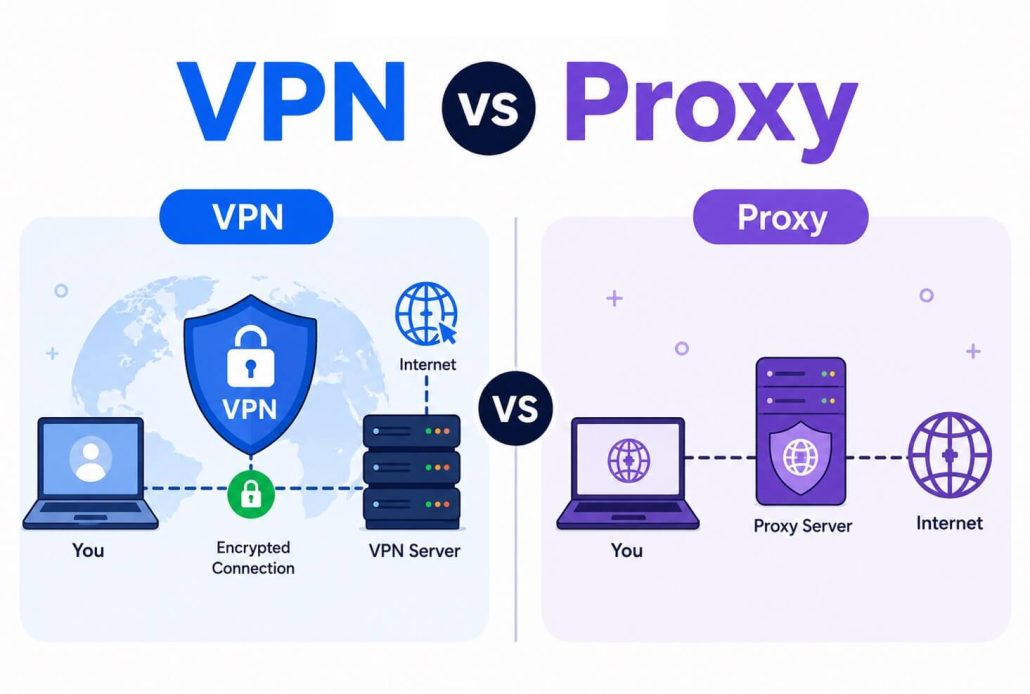
VPNs and proxies are two options you can use to protect your privacy when using public WiFi or to unblock geo-restricted content. However, choosing between them can be confusing, especially if you are new to these tools. To make what a VPN vs proxy is clearer, let’s break down the differences in simple terms.
Think of a VPN (Virtual Private Network) like a secure tunnel for your internet connection. It encrypts everything you do online and routes it through a private server, so your data stays private, and your real location is hidden. For example, if you were sending a letter, a VPN would put it in a locked box and deliver it through a secret route, so nobody could read it or track where it came from.
A proxy, on the other hand, acts more like a middleman or messenger. When you use a proxy, your internet traffic goes to the proxy server first, which then passes it along to the website or service you want to reach. The proxy hides your real IP address, making it look like your request comes from somewhere else. However, unlike a VPN, a proxy does not encrypt your data, so anyone watching could still potentially see what you are doing. Proxies can also be slower, especially if the server is busy.
In short, a VPN secures and hides all your internet activity, while a proxy simply acts as a go-between without providing strong security.
Besides that, VPN and proxy servers also differ in their privacy level, security, unblocking capabilities, usage, and application. Let’s look at these key differences before exploring these two technologies one by one to help you make an informed choice based on your specific requirements.
Proxy Vs VPN: Key Differences Between Proxy and VPN
| Feature | VPN | Proxy |
| Encryption | Yes | No |
| Privacy | Full privacy (data encryption, no-log policy) | Basic privacy (no internet traffic encryption, may log your data) |
| Speed | Slow due to encryption | Faster because of no encryption |
| Security | Stronger | Limited |
| Unblocking Capability | Unblocks streaming services and bypasses geo-restrictions | Unblocks geo-restricted content, but not in all cases |
| Best For | Complete protection across all websites and apps | Light browsing, one-time use, usually covers only one app |
| Supported Applications | All internet apps, including VOIP and P2P | Specific HTTP/HTTPS web traffic |
| Ease of Use | Easy to install and use | Complex configuration |
| Free/Paid | Usually paid | Usually free |
So, which one should you use? To answer this question, let’s look at both VPN and proxy in detail, with their advantages and disadvantages.
What Is a VPN
Imagine browsing in the U.S., but your IP address shows you are in Russia, making your location and activities untraceable. That’s exactly what a VPN does. The best VPN is a tool that ensures privacy and protects your sensitive data by masking your IP address and encrypting your internet traffic.
As your internet traffic is encrypted and your real IP address is hidden, government agencies, hackers, or your Internet Service Provider (ISP) cannot track and monitor your online activities easily.
If used responsibly, i.e., not for things against the law or your own conscience, such as downloading and distributing copyrighted material, VPNs are best for securing your connection on public WiFi networks, accessing content restricted in your region (for example, unblocking Hulu to watch U.S. exclusive shows when you are not in the U.S.), and protecting your sensitive information online.
How a VPN works
A VPN is like a secure tunnel for your internet data. When you connect to a VPN, all your online activity travels through this private tunnel to a VPN server, which replaces your real IP address and hides your location. Along the way, the VPN encrypts your data so nobody else can see what you are doing. In simple terms, the VPN keeps your information hidden and protected as it moves between your device and the internet.
Types of VPN
To meet your various requirements, a VPN can mainly be a remote access VPN, site-to-site VPN, client-to-server VPN, SSL/TLS VPN, or OpenVPN.
- Remote Access VPN: With a remote access VPN, you can connect securely to a private network over the internet. It works best for remote workers who want to access their corporate network while working remotely.
- Site-to-site VPN: It securely connects two or multiple secure networks, for example, the head office and branch offices, to ensure secure internal communication.
- Client-to-server VPN: It securely connects your device and a central server, especially suitable for individual internet access.
- SSL/TLS VPN: It encrypts the connection to web applications to ensure secure web-based resources.
- OpenVPN: OpenVPN is a highly secure, open-source VPN protocol that ensures security using SSL/TLS for encryption.
While VPNs help protect your sensitive information, secure your connection from snoopers, access blocked content, and ensure a private browsing experience, they also have their fair share of advantages and disadvantages.
Advantages of using a VPN
- Protects all data that moves to or from your device.
- Reduces ISP throttling by encrypting your traffic.
- Works system-wide, i.e., across all applications and not just the browser.
- Easy location spoofing, as VPN providers have many server locations globally.
Disadvantages of using a VPN
- The best VPNs are generally paid ones, except for a few genuine exceptions, such as PrivadoVPN that we reviewed.
- VPNs can slow your internet speed, which is especially noticeable when watching videos.
- Overloaded servers and long wait times if the VPN provider does not have the infrastructure to handle the increased traffic during peak hours.
Now that you are familiar with VPNs and how they work, let’s explore proxies for a fair proxy vs VPN comparison.
Also know: Best Free VPN for Dark Web to Use for Safety
What Is a Proxy
The proxy server is an intermediary that makes requests to websites on your end and then forwards the response to you. In other words, a proxy directs your internet traffic through another computer instead of your own computer. When you enable a proxy, it routes your internet traffic via the proxy server, hiding your actual IP address.
How a proxy server works
A proxy server works by redirecting the web requests to the proxy server. The proxy accesses the desired website, retrieves the data, and then sends the data back to your device.
To put it simply, you send a request to access a website; the request reaches the proxy server instead of going directly to the internet; the proxy then forwards that request to the target server; the server then responds to the proxy; the proxy then performs a security check and forwards data to you.
Moreover, like a VPN, proxy servers can also be of five main types.
Types of proxy servers
HTTP proxy, HTTPS proxy, SOCKS proxy, transparent proxy, and residential proxy are the five main types of proxy servers.
- HTTP proxy: Ideal for web browsing, streaming, and accessing restricted websites, it routes browser-specific traffic.
- HTTPS proxy: For secure online transactions and browsing, it ensures connection security by encrypting your browser traffic.
- SOCKS proxy: Most suitable for gaming, file sharing, and video streaming, SOCKS proxy can handle all your internet traffic, but without encryption.
- Transparent proxy: Mostly used for parental control and content filtering, transparent proxy works without user interaction.
- Residential proxy: To access blocked content or for web scraping, you can use a residential proxy that routes your internet traffic via real devices to ensure anonymity.
While a proxy allows web scraping, i.e., large-scale data collection without revealing your real IP, provides faster speed, and saves bandwidth, like a VPN, it has both advantages and disadvantages.
Advantages of using a proxy server
- The web filter applied to your browser; it can help control access to certain content or websites in your network.
- Ensures anonymity by hiding your IP address.
- It does not need installation; you can use it directly through your browser settings.
- A proxy server caches web pages you visit frequently to improve browsing speed.
Disadvantages of using a proxy server
- It does not encrypt data, leaving your online activities vulnerable.
- A proxy server may be unable to bypass advanced geo-restrictions or access specific content types.
- Proxy servers can be slow and unstable, leading to failed connections.
- Some proxies may not support all operating systems or devices.
By now, you have sufficient information to decide which is better: a proxy or VPN. While making this decision, you should especially consider your specific requirements for privacy and security, speed, ease of use, and cost.
Which Is Better: Proxy or VPN
Considering the complete analysis of what a VPN vs proxy is, a proxy server is better when you want to hide your IP address only on a single website, change your location quickly, are testing content or websites from different regions, or do not need strong security or privacy. A VPN is a better choice if you want complete security to handle sensitive data, use public WiFi frequently, or ensure private browsing with high anonymity.
Also know: How to Fix Windows Could Not Automatically Detect This Network’s Proxy Settings Error
Frequently Asked Questions
Q1. Can I use a proxy without a VPN?
Yes, you can use a proxy without a VPN. A proxy is a separate server that masks your IP address without encrypting your data.
Q2. Can I use a VPN as a proxy?
Yes, you can use a VPN as a proxy. However, to use a consumer VPN application as a localized application-level proxy, such as an HTTP or SOCKS5 proxy, you need a specialized routing tool or container setup.
Q3. How do I tell if I have a VPN or proxy?
To check if you have a VPN or proxy connection active, you can review your WiFi settings. To check the WiFi settings in Windows, follow the path Windows key + I > Network & Internet > VPN or Proxy.
Hopefully, this guide helps you make the right choice between a proxy server and VPN. To recap, what is a VPN vs. a proxy? A VPN encrypts your entire internet traffic and wins when complete anonymity, private browsing, and security are your top priorities. A proxy server wins when you only want to hide your IP address to unblock geo-restricted content and speed up browsing without encryption. However, the final choice is always yours after considering your needs.