

Imagine the hiring managers in your enterprise fretting day in and out, assessing and shortlisting candidates, scheduling interviews, and then managers spending big chunks of time in employee performance monitoring, the tasks that the best workflow automation software can help tackle effectively in much less time, so that human resources (including hiring managers and team managers) focus on more productive tasks that actually matters the most. Even studies show that automation can help 60% of employees save 30% of their time.
Not only recruitment and performance tracking, but workflow automation tools also have their usage in multiple business functions across various industries, such as invoice processing, data entry, order fulfillment, expense management, document management, travel booking, social media management, healthcare management, project management, IT support, manufacturing, sales management, customer feedback, inventory management, and quality control.
A workflow automation platform helps you automate these functions for faster operations, increased accuracy, and enhanced productivity and efficiency.
To ensure we provide the most reliable recommendations, we adopted a thorough evaluation methodology. We spent several weeks conducting detailed research and testing various workflow process automation tools. Our process involved hands-on testing, expert consultations, and evaluation based on criteria such as ease of use, functionality, integration capabilities, and security features. By combining these approaches, we aim to deliver trustworthy insights for your decision-making.
Before introducing you to these time and effort-saving automation tools, let’s clear up the confusion about what these tools are, why you need them, and our selection criteria.
What Is Workflow Automation Software
Simply put, workflow automation tools are software designed to automate business processes to reduce costs, increase productivity, and improve customer satisfaction.
These tools help reduce costs through reduced manual work and streamlined operations to manage complex processes effortlessly.
For example, your customer support team can concentrate on more complex tasks when you have customer service workflow tools in place. The customer service workflow automation software automatically assigns tickets to agents and sends automatic replies to common questions to ensure faster response times, resulting in enhanced customer satisfaction.
Apart from that, there are multiple reasons your company needs process automation tools. Let’s list them next.
Why You Need a Workflow Automation Software
Automating workflows brings multiple benefits by freeing up your employees from redundant tasks and helping them solve more complicated problems. Some of these advantages include the following.
- It helps direct your employees’ capabilities to better problem-solving and innovation by freeing them from repetitive tasks that require significant manual effort and waste their skills.
- Through workflow automation platforms, you can improve your service delivery by reducing response time for customer queries, resulting in improved customer satisfaction and efficient operations.
- The best business workflow automation and productivity tracking software helps managers monitor performance without micromanagement, letting employees take responsibility for their tasks.
- A workflow automation tool enables better cross-functional collaboration through seamless communication and transparency across various teams, ensuring everyone is on the same page.
Now that you are familiar with automation software and their benefits for your business, let’s reveal how we picked the best tools for you to choose from.
How We Selected the Best Workflow Automation Software
We tried different workflow automation tools available in the market for weeks. Then, compared them based on the following factors.
- A powerful workflow automation software must also be user-friendly and simple to build.
- We checked if the software is cloud-based. While this is not a non-negotiable, a cloud-based workflow automation platform is generally more accessible, reliable, and secure.
- The top workflow automation software allows integration with third-party apps, such as CRM, ERP, etc.
- These tools must be customizable according to your business requirements to tackle both simple and complex processes efficiently.
- You should have access to centralized data reports and process analytics to get deeper insights into your business processes and optimize your workflows.
- A high level of data security is non-negotiable. The software must offer top-notch security features to keep your data secure.
Keeping in mind the above essential features, let’s walk through the best workflow automation platforms.
What Are the Best Workflow Automation Software: Our Top Recommendations
The following is a list of the best workflow automation tools, thoroughly reviewed with their pros and cons, to help you choose the right tools for your business.
1. Monday.com
Best For: Marketing teams, event planners, product development, creative departments, content creation, and remote teams
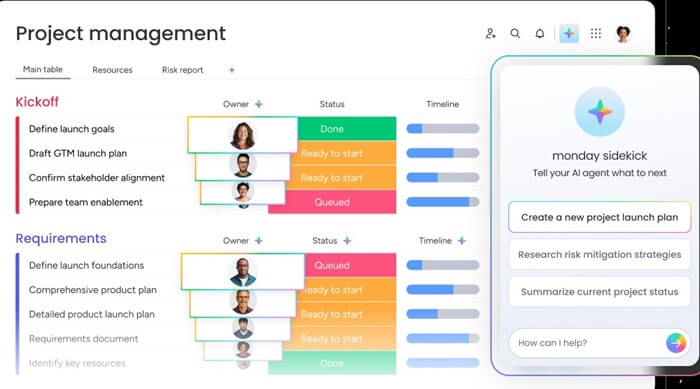
Meet Monday.com. It is an AI workflow automation software that allows you to build custom workflows with a no-code interface, define admin controls to ensure cross-org consistency, easy task creation and assignment, an option to add a custom time tracking field, customizable dashboards to monitor key metrics, and the following features.
Key features of Monday.com
- It helps you with efficient team management. You can effortlessly track the involvement of each team member in the project and their workload for better resource allocation.
- Monday.com keeps communication centralized with comment threads and notifications to ensure the team can remain aligned and up-to-date on project developments.
- It offers customizable visual workflows to give you a personalized view of your team’s requirements.
- You can create forms to collect feedback from both internal and external sources for easy data collection and quick action on insights.
- It offers a plethora of integrations with other tools and software, such as Slack, Microsoft Teams, Google Drive, and more.
Pros
- Easy-to-use interface
- Highly customizable
- Strong collaboration with features like real-time updates and file sharing
- Highly scalable
Cons
- Steep learning curve if you are new to workflow automation
- Occasionally, slow performance when working with gigantic datasets
Click here to learn more about Monday.com
Also know: Best SNMP Management Software for Network Monitoring in Windows
2. Jira Software
Best For: Software and development teams, business and HR teams, marketing teams, and IT service management
Next, we have Jira Software on our list of the best workflow automation software. It is a popular project management software, especially for Agile software development teams. Developed by Atlassian, this software offers customizable workflows, Agile boards with support for built-in Kanban and Scrum boards, seamless integration with a variety of third-party applications, and the following standout features.
Key features of Jira Software
- The no-code builder lets you automate repetitive tasks, such as notifications and issue updates. You can apply automation rules, including conditions, triggers, and actions.
- It allows you to visualize project roadmaps across teams and the whole organization.
- Jira Software allows issue and bug tracking for efficient software development.
- You can create personalized dashboards and generate reports to get detailed insights into project trends and status.
- It lets you track the time spent on various issues to understand project timelines and allocate resources effectively.
Pros
- Customizable and powerful workflow automation software
- Extensive integration options
- Strong collaboration features
Cons
- Learning curve may be steep for new users
- Resource-intensive, may cause slowdowns

Click here to learn more about Jira Software
3. Screendragon
Best For: Marketing agencies, design studios, corporate marketing teams, advertising departments, project managers (creative projects), and consulting firms
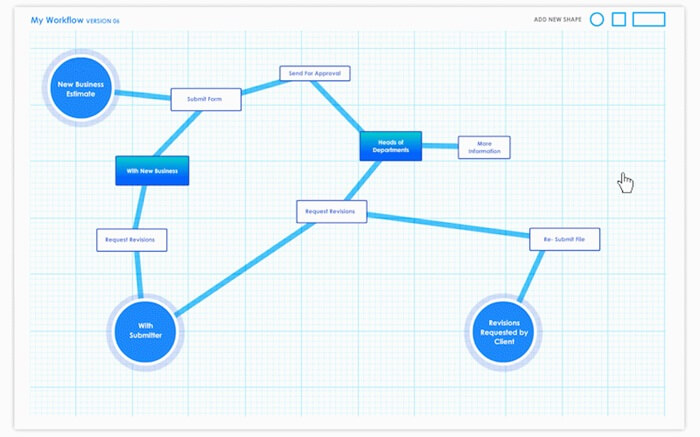
Here is Screendragon among the best workflow automation software examples. It is a comprehensive project management tool with customizable workflows to track tasks and deadlines, collaboration tools for centralized feedback, approvals, and communication, and the following notable features.
Key features of Screendragon
- It protects your data with enterprise-grade encryption and role-based access controls.
- With Screendragon, you can smartly allocate resources to a task to avoid underuse or overload.
- It offers actionable and detailed project information insights.
- There are resource tracking and budget estimation tools to help manage time and costs effectively.
- It supports document sharing across the organization.
- Screendragon supports streamlined and conditional forms for easy approvals, briefs, etc.
- With AI resource forecasting, it predicts resource capacity and availability by analyzing the historical project data.
Pros
- Customizable dashboards to help you prioritize relevant data
- Integration with top ERP systems and apps, such as SAP, PeopleSoft, Trello, Google Drive, Microsoft Dynamics, etc.
- Open API allows you to apply custom integrations with any system
- Extremely easy-to-use enterprise AI workflow automation software
Cons
- Initial setup and onboarding are time-consuming
- Smaller teams with relatively simple needs may find it too complex
Click here to learn more about Screendragon
4. Confluence
Best For: IT and support teams, HR and people teams, product and software development teams, marketing teams, and project management teams
Confluence can be the best choice if you are looking for documentation workflow automation tools. It stands out for its user-friendly interface, commenting features, rich text editing, version history, simplified document creation and editing, and the following features.
Key features of Confluence
- It allows centralized storage and organization of the team’s knowledge to enable quick information access as and when required.
- There are ready-made templates to begin your tasks and projects, saving time and maintaining consistency across the team.
- The search functionality allows you to find the needed documents and information quickly without hassle.
- Confluence offers task tracking features, allowing you to assign tasks and track progress efficiently.
Pros
- Clean organization of large volumes of documents
- Powerful real-time collaboration features
- Extensive integration with Atlassian, Jira, Git, Slack, etc.
Cons
- Steep learning curve for those unfamiliar with workflow automation
- Relies on paid marketplace apps for document-approval workflow

Click here to learn more about Confluence
5. Studio Creatio
Best For: Cross-functional teams, business/citizen developers, and IT departments
Here we have Studio Creatio, a generative AI-powered workflow automation platform to automate your enterprise workflows in a lot less time. Even if you are a non-coder, you can easily automate business processes and set rules to streamline operations with Studio Creatio. Moreover, this software allows you to connect and manage any number of apps and environments without restrictions and offers these remarkable features.
Key features of Studio Creatio
- It helps you make informed decisions via OpenAI integration and built-in AI technologies, with intelligent algorithms.
- There are a plethora of ready-made apps and components you can effortlessly integrate and customize to suit your needs.
- Studio Creatio can be integrated with PandaDoc, Chat Master, Calendly, SharePoint, Shopify, Zoom, Asterisk, Zapier, Microsoft Teams, SAP BusinessOne, and QuickBooks.
Pros
- Supports AI process recommendations
- Highly customizable; you can customize it for different use cases
Cons
- Not an ideal quick start solution
- Planning and designing workflows is effort-consuming

Click here to learn more about Studio Creatio
Once you have selected a workflow automation software based on your business needs, the next step is to build an automated workflow. Below is a quick overview of how to do it.
Also know: Best Data Backup Software for Windows
How to Build Automated Workflows
The following is a series of steps to build an automated workflow using a workflow automation tool.
- Identify the process you wish to automate.
- Break the identified process into smaller and more manageable steps, defining the inputs, outputs, and dependencies for all steps.
- Create a workflow template that visually represents the process that you will automate.
- Set up the automation logic for every step in the process to be automated.
- Run the workflow on test data to ensure it is working properly.
- Deploy the workflow in the production environment.
- Track the workflow performance, identify errors or problems, and make changes/updates to ensure it continues to work correctly.
Best Workflow Automation Software: The Conclusion
That’s how you can automate different business processes, such as onboarding, time sheet approvals, budget approvals, invoicing, incident response, campaign management, lead generation and management, and customer service workflows, with the best workflow automation software tools above.
You can choose any workflow automation tool from the list in this article, depending on your requirements, to increase efficiency, ensure compliance with policies and regulations, improve accuracy, reduce approval cycles, decrease manual processing, enhance communication, save cost, improve visibility, ensure customer satisfaction, improve processes, manage workloads better, and minimize errors.
To make the most impact, consider prioritizing features or business areas for automation based on their potential to generate significant results quickly. Start by identifying high-volume tasks or processes that frequently encounter bottlenecks. Then, evaluate these areas for their potential improvements in efficiency and cost savings. Focus first on automating processes that align with your strategic business goals. This prioritization approach helps ensure that you’re directing resources and efforts toward high-impact opportunities.
However, if you have any questions or confusion, feel free to let us know through the comments section. You can also share your feedback about this article in the comments. And for more such free software recommendations and tech guides delivered right to your inbox, subscribe to our newsletter.
