

Nothing irritates a PC user more than slow performance, Blue Screen of Death (BSOD) errors, random crashes, or freezes, especially if you are a power user or a gamer. Since most of these issues are RAM-related, you need an in-depth memory tester to pinpoint the exact problem for troubleshooting and verifying system stability.
When it comes to memory checking, MemTest86 seems to be the most popular free tool that runs from a flash drive and is used by professionals to test the RAM. To set up MemTest86, you first download the image file from the official website and use a utility like Rufus or the included installer to create a bootable USB flash drive. After preparing the drive, you simply restart your computer and boot from the USB to begin testing. However, it may be confusing for beginners, and you may need software that is better compatible with modern hardware and has faster testing times.
Hence, keeping in mind the shortcomings of MemTest86, this article introduces you to the top-rated memory diagnostic tools that offer high speed and efficiency, apply comprehensive testing algorithms, and have other useful features. Let’s get started right away to save valuable time.
What Are the Best Memory Testers for Windows
The best memory checker tools that are also the top MemTest86 alternatives include programs like Windows Memory Diagnostic Tool, DocMemory PC RAM Diagnostic, Hiren’s BootCD, MemTest64, and Roadkil’s RAM Test.
To help you choose the most suitable tool, here are quick recommendations by user type: Beginners will find Windows Memory Diagnostic Tool and Roadkil’s RAM Test very easy to use. Gamers and users who need quick, in-Windows results may prefer MemTest64 for its fast detection and overclocking checks. Advanced users and IT professionals can benefit from the advanced features found in DocMemory PC RAM Diagnostic or the comprehensive utility set of Hiren’s BootCD. Below is a detailed overview of these tools.
1. Windows Memory Diagnostic Tool
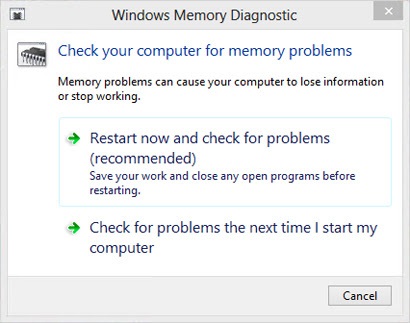
Microsoft offers a built-in free memory tester for Windows, called the Windows Memory Diagnostic Tool. Often an initial step to troubleshooting the Blue Screen of Death errors, system freezes, and application crashes, this tool runs comprehensive memory checks during system reboot to identify errors. Moreover, besides a simple interface that only needs a system restart, here is what this tool has to offer.
Key features
- Three testing modes: basic, standard, and extended
- Automatically shows the results via a notification when you log in
- Results available in the Event Viewer for detailed analysis
Pros
- Completely automatic memory checker
- Downloads fast due to small file size
Cons
- Not been updated for a long time
- Extended mode takes considerably longer
To access the Windows Memory Diagnostic Tool on your computer, press Windows + R, type mdsched.exe in the box that appears, and press Enter.
Click here to learn more about the Windows Memory Diagnostic Tool
Also know: Download and configure the Office Customization Tool in Windows
2. DocMemory PC RAM Diagnostic
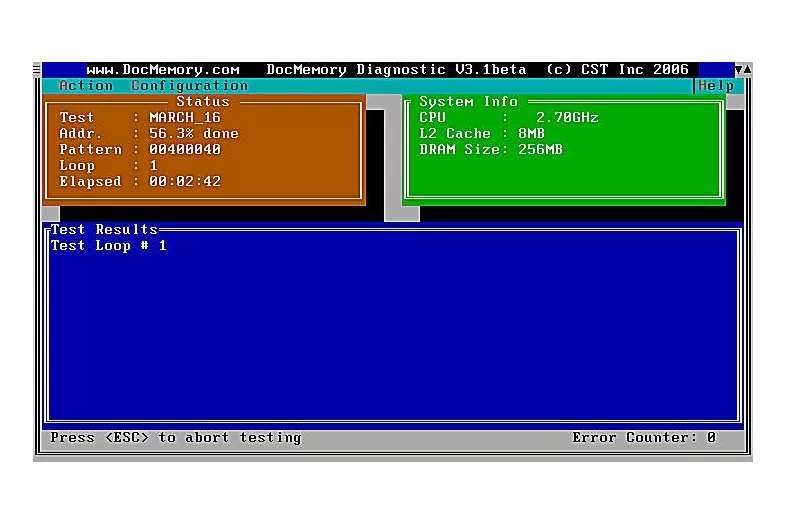
DocMemory PC RAM Diagnostic is another software like MemTest86 to check the memory. It is among the oldest memory checkers that identify all possible memory faults in a PC. Its powerful test pattern uses both the PC Base and Extended Memory to detect defective memory. Moreover, below are its notable features.
Key features
- Use of sophisticated algorithms, such as MATS, March B+, and March C-
- Boots directly, bypassing the operating system limitations
- Automatically detects memory capacity and displays detailed information
Pros
- Free to use
- Robust test pattern
Cons
- Seems outdated and old-fashioned
- Requires a floppy disk
Click here to learn more about DocMemory PC RAM Diagnostic
3. Hiren’s BootCD
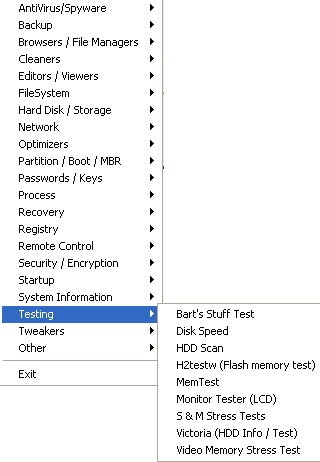
Next, we have Hiren’s BootCD on our list of the best memory testers. This freeware has many embedded RAM checkers, RAM testers, and RAM scanner programs. In other words, it is an emergency rescue tool to repair unbootable PCs with a live Windows interface, data recovery tools, hard drive diagnostics, password resetting, and malware removal. Here are its notable features.
Key features
- A Windows-style desktop from a USB drive to access unbootable computers
- Comprehensive data recovery, hard disk management, system troubleshooting and security, imaging and backup, networking and web browsing, driver and registry tools
Pros
- Massive suite of utilities
- Functional Windows 10/11 PE interface
- Supports UEFI booting and modern hardware
Cons
- Not beginner-friendly
- High system requirements; needs at least 2 GB RAM
Click here to learn more about Hiren’s BootCD
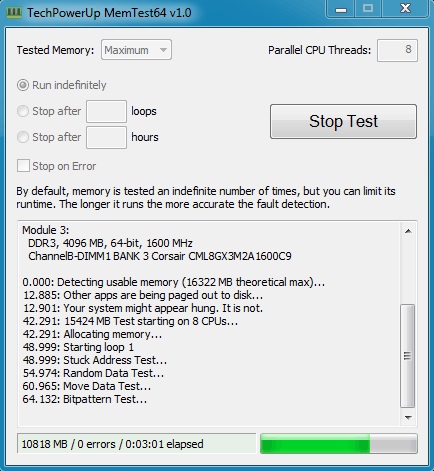
4. MemTest64
MemTest64 is a free and portable Windows memory checker like MemTest86. Running directly within Windows, it tests your RAM for hardware problems, instability, and overclocking issues. Below are the features that separate it from other similar software.
Key features
- Active memory testing when Windows is running, maximizing available RAM for testing
- Automatic memory hardware error detection and logging to prevent Blue Screen of Death and data corruption
Pros
- Discovers unstable memory settings quickly within minutes
- Optimized for modern 64-bit operating systems
Cons
- High-load testing can slow down the system
Click here to learn more about MemTest64
Also know: 5 Best RAM Cleaners for Windows PC
5. Roadkil’s RAM Test
Roadkil’s RAM Test is an open-source, lightweight, and portable Windows memory tester. It can identify potential issues in memory hardware while running in the background when you do other work. In addition to background functionality, it offers these features.
Key features
- It offers all relevant details about your total system RAM, RAM read speed, available memory, etc.
- Memory bandwidth measurement by calculating both read and write speeds
Pros
- Simple and straightforward interface
- Supports both old (Win 9x/Me) and new (Windows 11) OS environments
Cons
- Less comprehensive than some other tools
- No frequent updates
Click here to learn more about Roadkil’s RAM Test
That concludes the best RAM tester tools available online, like MemTest86, to check Windows memory and help troubleshoot various problems. We hope you find what you were searching for. However, if you have any concerns or questions about this article, you can leave us a comment.
Frequently Asked Questions
Q1. How do I test my RAM on Windows?
You can test your computer’s RAM with the built-in Windows Memory Diagnostic tool or other programs to check the memory in this article.
Q2. Does chkdsk check RAM?
Chkdsk is a Windows utility that scans and repairs file system integrity, metadata, and physical bad sectors on hard or solid-state drives. It does not check RAM.
Q3. Is it safe to run a RAM test?
While running a RAM test is safe and generally not damaging to your hardware, you must keep safe operational limits in mind when stress-testing RAM.
Q4. Is there any online RAM tester?
While not very reliable, online tools like WuTools offer memory speed tests.
