

Do you want a Windows-like feel on your computer, minus the annoying hardware changes, privacy concerns, forced AI integrations, or licensing costs of Windows? Or do you want to breathe new life into your old PC that can no longer run Windows? Or do you need a command-line environment with a smooth graphical user interface? Then, the best Linux distro for Windows users is what you need.
The best Linux distros for Windows users are feature-packed like Windows, but with a better user interface. It is an operating system built on the Linux kernel. This operating system includes software packages such as system utilities, a desktop environment, and applications, designed to meet different user needs, such as greater customization, better security, and cost-effectiveness (most Linux distros are free).
However, with too many Linux distributors or distros available online, choosing the right one can be confusing. Thus, this guide offers carefully selected options for the best Linux distribution for Windows users, which are the perfect fit for both Linux-experienced users and beginners due to their user-friendly and simple setup.
What’s the Best Linux Distro for Windows Users
Ubuntu, Fedora, elementary OS, Debian, and Deepin Linux are the best and easiest Linux distros for Windows users, with each of these distributions having its unique strengths.
For example, Ubuntu is the best free Linux distro for Windows users with a large software repository and excellent community support. Fedora, previously Fedora Core, offers a modern KDE desktop, a fresh kernel, and graphics support. elementary OS is the easiest Linux distro for Windows users with the Pantheon desktop, a curated AppCenter, Flatpak support, and helpful system settings and parental controls. Debian is one of the best Linux distros for experienced users, with over 60,000 free software packages available for easy installation on your computer. Deepin Linux is best for its home-brewed desktop, first-boot wizard, and touch-friendly interface.
Below is a detailed overview of each of these Linux distros.
1. Ubuntu– Best free and open-source Linux distro for Windows users
System Requirements: 2 GB RAM, 25 GB storage, 1024×768 display, UEFI or Legacy BIOS boot
Ubuntu is a free and open-source Linux distribution for Windows users, popular for its extensive software availability and ease of use. Designed for both experienced users and beginners, Ubuntu offers excellent community support, regular updates, and the following features.

Key features
- GNOME (GNU Network Object Model Environment), i.e., a clean and intuitive desktop environment.
- Ubuntu Software Center for easy installation of a wide range of applications.
- Readily available assistance through wikis, forums, and tutorials.
- Long Term Support (LTS) for versions that get updated for five years to ensure stability and security.
Also know: Best Free Windows Server Backup Software
2. Fedora – Best Linux distro for developers, system administrators, and users who need the latest Linux advancements
System Requirements: 2 GB RAM, 15 GB storage, 2GHz dual-core or faster processor
Sponsored by the Red Hat Enterprise Linux distribution, Fedora is the best Linux distro for Windows users, which emphasizes integration with the latest technologies. It allows users to explore new and advanced technologies and features through the latest software versions and the following notable features.

Key features
- SELinux (Security-Enhanced Linux) for restricted program access and system integrity, offering a secure experience.
- An option to choose from a variety of Fedora editions, including Server, IoT, and Workstation (for developers), for a customized experience.
- The latest GNOME desktop ensures a visually pleasing, modern interface.
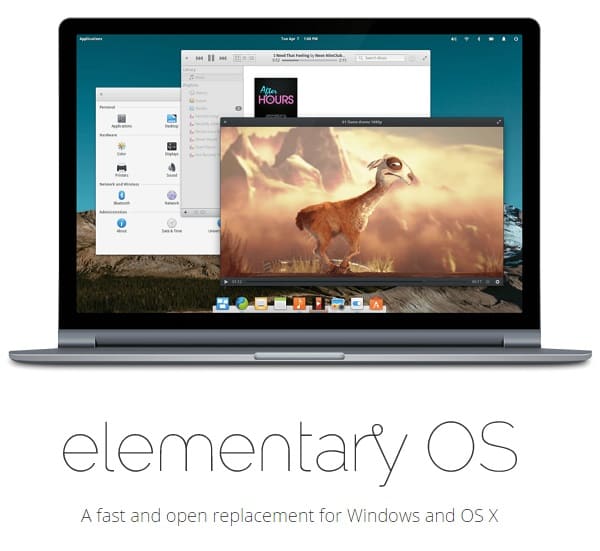
3. elementary OS– Best Linux distribution for Windows users with a macOS-like experience
System Requirements: 4 GB RAM, 15 GB storage, 1024×768 display, UEFI or Legacy BIOS boot
Are you a Windows user looking for a clean and distraction-free experience like macOS? Then, elementary OS is the best choice for you. Elegant and intuitive, elementary OS offers a sleek, modern, and minimalistic interface with a custom Pantheon desktop environment, an AppCenter with curated applications, and the following remarkable features.
Key features
- It ensures data privacy and avoids intrusive tracking.
- A fast and the best lightweight Linux distro for Windows users that offers an efficient and responsive experience on a wide range of hardware.
- A beginner-friendly distro with customization options to customize the OS according to your preferences.
- Community support and detailed guides to help you make the best use of your system.
4. Debian– One of the best Linux distros for Windows users, with easy access to applications without pre-installation
System Requirements: 512 MB RAM (no desktop), 1 GB RAM (with desktop), 4 GB hard drive space (no desktop), 10 GB hard drive space (with desktop)
Debian is one of the easiest Linux distros for Windows users with a little Linux experience, and those who need easy application access without these apps pre-installed. It offers around 60,000 pre-compiled software programs in a friendly format that you can easily install on your computer for free. Additionally, the following are its other notable features.

Key features
- A stable and smooth upgrade process.
- Extensive hardware support and proprietary hardware device drivers.
- Support for multiple hardware architectures, IoT and embedded devices, a large number of software packages, a bug tracking system, and other tools for developers.
5. Deepin Linux– Best Linux desktop distro for Windows users
System Requirements: 4 GB RAM, 64 GB hard disk, Intel Pentium IV 2GHz or higher CPU, AMD64 (AMD or Intel) architecture
Deepin Linux is one of the best Linux distros for Windows users due to its home-brewed desktop, first-boot wizard, and touch-friendly interface. This Debian-based distro offers a custom, aesthetically pleasing desktop environment known as DDE. Deepin is available both as a stable and an experimental version. The experimental version is the best if you are searching for a Linux distro for personal use or non-production environments. It offers a visually rich flow design, added widgets, and the following Deepin Linux features.

Key features
- A first-boot configurator to change icons, enable window effects, and more to customize the installation’s look and feel.
- An efficient mode to run the installation on lower-end computers, making the best possible use of available resources.
- A custom app to perform various desktop tasks, for example, listening to music, watching films, taking backups, viewing images, recording screencasts, and more.
- An App Store that allows users to discover and install new applications easily.
- Uninstallation section to uninstall any unwanted applications.
That’s all for the roundup of the best Linux distros for Windows users. Hopefully, this helps you find what you are looking for. If you have any suggestions to improve this guide or questions that remain unanswered in this article, do let us know in the comments section.
Also know: Best Productivity Apps for Windows
Frequently Asked Questions
Q1. What is a Linux distro?
A Linux distro or distribution is an operating system built on the Linux kernel. This operating system contains a bundle of software packages designed for various experienced and novice users, including a desktop environment, applications, and system utilities.
Q2. What Linux distro is closest to Windows?
Deepin Linux offers one of the most Windows-like experiences in terms of visual aesthetics, interface, and workflow.
Q3. Which Linux is best for my PC?
The best Linux distro for your PC depends on your specific requirements and experience. The best available options include Ubuntu, Fedora, elementary OS, Debian, and Deepin Linux. You can read the guide above to learn more about them.
Q4. Why switch from Windows to Linux?
Switching from Windows to Linux allows you to customize everything about your operating system, offers better security with a permission-based system, helps you save money on software licenses, and allows you to have more control over your operating system.
