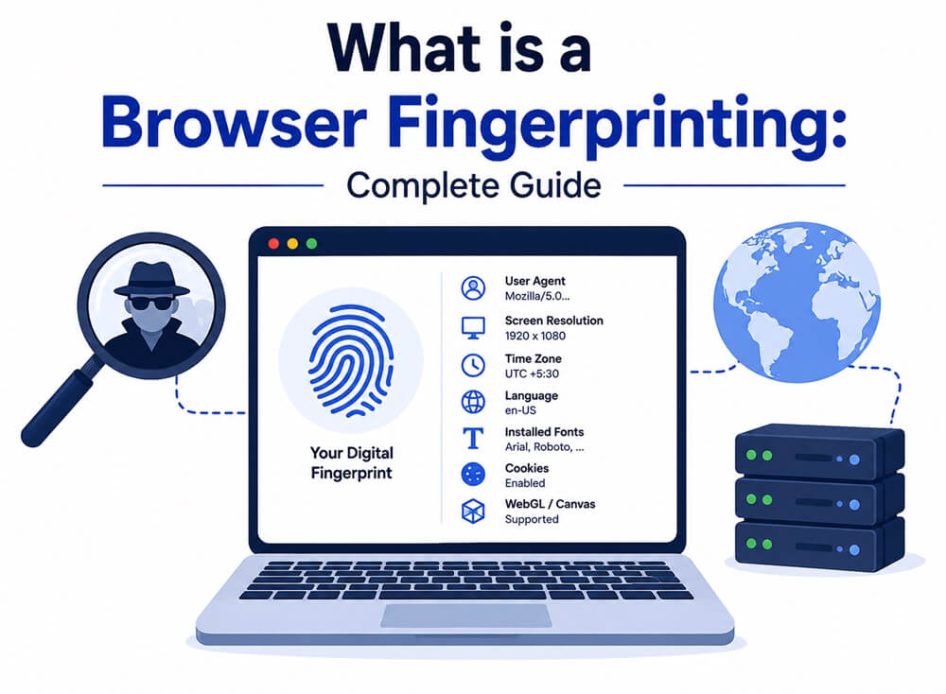
To maintain the privacy of your device information and device is a big challenge in this elongated world of the internet. One of the ways to ensure privacy is to keep the fingerprinting of the users safe. And to do so, one of the main methods is browser fingerprinting. It helps in securing the fingerprints you left unintentionally, which can be easily misused.
But the question arises, ‘What is a browser fingerprint?’. To learn this, we are here with a complete understanding of the browser fingerprint, methods to secure them, and how it properly works.
What Is a Browser Fingerprint?
The browser fingerprinting is the most powerful method to track internet usage and information about the user through the web browsers. Everything lays under your fingerprints, and everything contains your fingerprints as well. what is a browser fingerprint
Even though all the secure browsers are prevented from these fingerprints and internet today chooses to accept the privacy and security for internet users.
What Information Can We Get Using Browser Printing?
A fingerprint browser can give different kinds of information about the user and the system you are using. As it uses different attributes of your system and browser of its users, so it has already collected information about the user.
The following are the characteristics you can derive from the device fingerprinting:
- The model’s name of the device you are using
- The operating system of the device
- All the audio and video capability of the system.
- The device’s browser version
- Time zone you are currently in
- The language settings the user is using
- About all the fonts installed and the plug-ins in the system.
Primary Uses of Browser Fingerprinting
After the question ‘What is a browser fingerprint?’ we also think of ‘What are the use cases of browser fingerprinting?’. We can understand it as the browser fingerprint has various use cases in different industries.
- The browser fingerprinting is mainly used to target advertisements for the advertising industry. To figure out about the audience you must target and the profiles you are using to build your conversation.
- Another use of browser fingerprinting is to authenticate user security and enhance it. There are several websites that use fingerprinting for verifying the login attempts from any kind of unknown device.
- The browser fingerprinting is also sometimes used for recovering the account using the previous fingerprints and verifying the identity.
- Most websites and industries use browser fingerprinting to personalize the content according to the individual users and their preferences.
Also know: How to Set up VPN on Chromecast
How Does Browser Fingerprinting Work?
The browser fingerprinting is the method to collect all the combinations of attributes and configurations. what is a browser fingerprint
1. Data Collection
The first step for the fastest browser is that you need to gather and derive all the information along with the wide range of data points. The primary information you need to gather and that includes the following:
- The type and the version of the browser you are using
- All the details about the operating system and further uniqueness.
- All your network information, like IP address or user agent string, can easily derive the network you are using.
2. Create Profile
With all the data points you have collected, find a unique way to ‘fingerprint’. And with this combination and data points, it is unlikely to have, like, two users at the same time. So, it is easy to create a unique profile for an attacker like yours.
3. Generating Fingerprint
With advanced algorithms and using all the data points you have collected till now will be processed and then generate a unique hash. These hashes or identifiers are used to represent the fingerprints of the users and store these fingerprints with third-party trackers.
4. Tracking
If you visit the same websites repeatedly, then the fingerprint gets stored in those websites, and your identity is easily recognized by attackers and foreign users. So, these websites prevent tracking all these fingerprints on your device. Keep the track of the session after these fingerprints are accessed across various websites and create a complete profile.
Also know: How to Change My Default Browser on Windows
How to Prevent Device Fingerprinting?
The fingerprint browser can easily prevent using some measures and help in preventing your system from fraudsters and hackers. And there are organizations that implement and have different safety measures for privacy and security.
The following are the strategies with protective measures along with antivirus software to use for your system.
Browser Extension
There are several browser extensions that are particularly designed with the features to block and disrupt all the interpretation of external fingerprint attempts. There are tools called Privacy Badger, uBlock Origin, and all anti-fingerprint attempts.
Private Browsing
When you wonder, ‘What is a browser fingerprint?’ to adopt privacy and browser with the built-in prevention for fingerprinting of browser. There are limitations for designed
Settings Adjustments
To minimize the information about the browser and the user to disable all the unwanted malicious interference. It also helps in reducing the plugins and browser settings for privacy and security. This also includes an ad blocker to block the exploitation for fingerprinting like JavaScript, WebGL, and all other canvas elements.
VPNs and Proxies
There are proxies, and sometimes VPNs are also used to hide your IP address and other details from hackers. These help in making your IP address, and it is difficult for the attackers to interfere in your activities. And these are also associated with all the digital fingerprints you leave unintentionally.
Frequently Asked Questions (FAQs)
Q1. What is a browser fingerprint?
Ans. The method of tracking to collect all the combinations of attributes and configurations. And these collected data points are analyzed with user browser and your system with your fingerprint. By collecting information about the type of the browser and its version, operating system, and profiles you are using.
Q2. What are the various risks of browser fingerprinting?
Ans. There are various risks involved in the usage of browser fingerprinting, and those risks involve that you might lose the privacy you have in your system. And it also involves the risk of being tracked by some malicious attacker without your consent.
Q3. Why do we use browser fingerprinting?
Ans. Browser fingerprinting is used to track the users across the internet, and it enhances the security for the users to authenticate the preventing of accounts and detect the fraud from the attackers.
When the question arises that ‘What is a browser fingerprint?’ then there are multiple ways in which you can easily secure your digital fingerprints. It is important for you to understand this invisible threat that is often ignored by everyone. To secure your fingerprint, you must follow all the steps and prevention measures mentioned in this article and make sure to keep your browser updated.