

Are your favorite games not launching on your PC, or are applications crashing at launch? The problem could be that the Microsoft Visual C Redistributable package is missing from your computer. You might see error messages like ‘MSVCP140.dll is missing’ or ‘VCRUNTIME140.dll not found,’ indicating that this guide can help solve the issue.
Microsoft Visual C Redistributable or Microsoft Visual C++ Redistributable is a runtime library your operating system needs to run applications developed in the Visual C++ language.
Without these runtime library files, modern PC games like Fall Guys or other Steam games may crash at launch, or you may encounter various errors when trying to open an application that depends on Microsoft Visual C++ Redistributable packages.
Hence, you can refer to the guide below to download the Microsoft Visual C Redistributable package on your computer.
Download Microsoft Visual C Redistributable All Versions (Latest Supported)
| Name | Architecture | Download Link | System Requirements |
| Visual C Redistributable 2025 | ARM64 | Download | Windows 10 (ARM64 editions)/ Windows 11, ARM64 processor, 1 GB RAM, and 50 MB of disk space |
| Visual C Redistributable 2025 | X86 | Download | Windows 11/Windows 10/ Windows Server 2025, 2022, 2019, 2016, 1 GB RAM, and 50 MB disk space |
| Visual C Redistributable 2025 | X64 | Download | Windows 11/Windows 10 (Home, Professional, Education, Enterprise)/Windows Server 2025, 2022, 2019, 2016, X64 or ARM64 processor, 1 GB RAM, 50 MB disk space |
| Visual C Redistributable 2022 | ARM64 | Download | Windows 10 (ARM64 editions)/ Windows 11, ARM64 processor, 1 GB RAM, and 50 MB of disk space |
| Visual C Redistributable 2022 | X86 | Download | Windows 11/Windows 10/ Windows Server 2025, 2022, 2019, 2016, 2012 R2, 2012, 2008 R2 SP1, 1.6 GHz processor, 1 GB RAM, and 50 MB disk space |
| Visual C Redistributable 2022 | X64 | Download | Windows 11/Windows 10 (Home, Professional, Education, Enterprise)/Windows Server 2025, 2022, 2019, 2016, 2012 R2, 2012, 2008 R2 SP1, Windows 7 SP1, X64 or ARM64 processor, 1 GB RAM, 50 MB disk space |
| Visual C Redistributable 2019 | ARM64 | Download | Windows 10 (ARM64 editions)/ Windows 11, ARM64 processor, 1 GB RAM, and 50 MB of disk space |
| Visual C Redistributable 2019 | X86 | Download | Windows 11/Windows 10/ Windows Server 2025, 2022, 2019, 2016, 2012 R2, 2012, 2008 R2 SP1, 1.6 GHz processor, 1 GB RAM, and 50 MB disk space |
| Visual C Redistributable 2019 | X64 | Download | Windows 11/Windows 10 (Home, Professional, Education, Enterprise)/Windows Server 2025, 2022, 2019, 2016, 2012 R2, 2012, 2008 R2 SP1, Windows 7 SP1, Windows 8.1, 1.6 GHz or faster processor, 1 GB RAM, 50 MB disk space |
| Visual C Redistributable 2017 | ARM64 | Download | Windows 10 (ARM64 editions)/ Windows 11, ARM64 processor, 1 GB RAM, and 50 MB of disk space |
| Visual C Redistributable 2017 | X86 | Download | Windows 11/Windows 10/ Windows 8.1/Windows 7 SP1/Windows Server 2025, 2022, 2019, 2016, 2012 R2, 2012, 2008 R2 SP1, 1.6 GHz or faster processor, 1 GB RAM, and 50 MB disk space |
| Visual C Redistributable 2017 | X64 | Download | Windows 11/Windows 10 (Home, Professional, Education, Enterprise)/Windows Server 2025, 2022, 2019, 2016, 2012 R2, 2012, 2008 R2 SP1, Windows 7 SP1, Windows 8.1, 1.6 GHz or faster processor, 1 GB RAM, 50 MB disk space |
Other than those mentioned in the table above, there are also unsupported legacy versions of Microsoft Visual C Redistributable you can download if any application requires these packages.
Download Microsoft Visual C Redistributable (Unsupported Legacy Versions)
| Name | Architecture | Download Link | System Requirements |
| Visual C Redistributable 2015 (Version 14.0.24212.0) | X86 | Download | Windows XP/Windows Vista/Windows7/Windows 8/Windows 8.1/Windows 10/Windows Server 2003/Windows Server 2008/Windows Server 2012, 1.6 GHz or faster processor, 1 GB RAM, 50 MB disk space, 5400 RPM hard drive |
| Visual C Redistributable 2015 (Version 14.0.24212.0) | X64 | Download | Windows XP/Windows Vista/Windows7/Windows 8/Windows 8.1/Windows 10/Windows Server 2003/Windows Server 2008/Windows Server 2012, 1.6 GHz or faster processor, 1 GB RAM, 50 MB disk space, 5400 RPM hard drive |
| Visual C Redistributable 2013 (Version 12.0.40660.0) | X86 | Download | Windows XP/Windows Vista/Windows7/Windows 8/Windows 8.1/Windows 10/Windows Server 2003/Windows Server 2008/Windows Server 2012, 900 MHz or faster processor, 512 MB RAM, 50 MB disk space, 5400 RPM hard drive |
| Visual C Redistributable 2013 (Version 12.0.40660.0) | X64 | Download | Windows 7 SP1 to Windows 11/Server 2012, 1.6 GHz or faster processor, 1 GB RAM, 50 MB disk space |
| Visual C Redistributable 2012 (Version 11.0.61030.0) | X86 | Download | Windows XP/Windows Vista/Windows7/Windows 8/Windows 8.1/Windows 10/Windows Server 2003/Windows Server 2008/Windows Server 2012, 900 MHz or faster processor, 512 MB RAM, 50 MB disk space, 5400 RPM hard drive |
| Visual C Redistributable 2012 (Version 11.0.61030.0) | X64 | Download | Windows 10/Windows 11/Windows7/Windows 8/Windows 8.1/Windows 10/Windows Server 2003/Windows Server 2008/Windows Server 2012, 900 MHz or faster processor, 512 MB RAM, 50 MB disk space |
| Visual C Redistributable 2010 (Version 10.0.40219.325) | X86 | Download | Windows XP/Windows Vista Service Pack 2/Windows 7/Windows Server 2003 R2/Windows Server 2008/Windows Server 2008 R2 |
| Visual C Redistributable 2010 (Version 10.0.40219.325) | X64 | Download | Windows 7/Windows Server 2008 R2/Windows Server 2003 R2/Windows Vista Service Pack 2/Windows XP Service Pack 3, 900 MHz or faster processor, 512 MB RAM, 50 MB disk space |
| Visual C Redistributable 2008 (Version 9.0.30729.5677) | X86 | Download | Windows Server 2008, Windows XP, Windows Server 2003, Windows Server 2008 R2, Windows 7, Windows Vista |
| Visual C Redistributable 2008 (Version 9.0.30729.5677) | X64 | Download | Windows Server 2008, Windows XP, Windows Server 2003, Windows Server 2008 R2, Windows 7, Windows Vista |
| Visual C Redistributable 2005 (VC++ 8.0) | X86 | Download | Windows Server 2008, Windows XP, Windows Server 2003, Windows Server 2008 R2, Windows 7, Windows Vista, and Windows 2000 |
| Visual C Redistributable 2005 (VC++ 8.0) | X64 | Download | Windows XP Professional x64 Edition/Windows Server 2003 x64 Editions/Windows Vista x64 Editions/Windows Server 2008 x64 Editions/Windows 7 x64 Editions/Windows Server 2008 R2 x64 Editions |
The tables above provide the Microsoft Visual C Redistributable download links for all versions.
Below are a few things to keep in mind when downloading the Visual C Redistributable package.
Things to remember when downloading the Microsoft Visual C Redistributable package:
- The best practice is to install both the X86 (32-bit) and X64 (64-bit) versions, as 64-bit apps use the X64 version and 32-bit apps use the X86 version. However, download only the X86 version if you have a 32-bit Windows system. To check which version your Windows system is running, go to the Control Panel, select ‘System and Security,’ and then click on ‘System.’ Under ‘System type,’ you will see whether your operating system is 32-bit or 64-bit. This will help ensure that you download the correct version of the Visual C Redistributable package needed for your system.
- The combined Microsoft Visual C or Microsoft Visual C++ Redistributable version for most modern games and apps is 2015-2022. You may need the 2013, 2012, 2010, 2008, and 2005 versions for older legacy software.
- If you get a specific “DLL is missing” error in a particular application, reinstalling that application can automatically install the required C++ Redistributable. If reinstalling the application does not resolve the issue, you can try manually downloading and installing the relevant Visual C++ Redistributable package from the official Microsoft website. Additionally, checking for Windows Updates and ensuring your system is up to date can also help in resolving such errors, as updates may include necessary fixes or additional components.
That’s all about the Microsoft Visual C Redistributable download. Let’s now answer a few related questions to clear up any confusion you may have.
Also know: How To Install Windows Fax And Scan In Windows 11
What Is Microsoft Visual C Redistributable
Imagine the relationship between a bulb and electricity. Without an electric connection, the bulb won’t light up. Similarly, without the correct Visual C Redistributable package, the programs written with Microsoft Visual C/C++ won’t run on your computer.
The Microsoft Visual C or C++ Redistributable is a library or package containing the necessary Visual C/C++ runtimes for the apps to function correctly.
In other words, the Visual C Redistributable or C++ Redistributable is a runtime library that applications developed in the Visual C or C++ language need to run smoothly.
Why You Need Microsoft Visual C Redistributable
The Microsoft Visual C or C++ Redistributable ensures application compatibility, as many games and applications are developed using the C++ (MSVC) build tools.
Moreover, these packages add essential functionality, allowing your computer to handle tasks such as playing sound, drawing graphics, managing file input or output, and performing mathematical calculations.
Additionally, if these libraries are missing, programs on your computer (those written in Visual C++) may crash or fail to open.
How to Install Microsoft Visual C Redistributable
You can follow the steps below to install the Visual C Redistributable package on your system.
- First, download the Microsoft Visual C Redistributable package from the download link in the tables in this article.
- Next, navigate to the location where you downloaded the package file.
- Double-click the package file.
- Read the license terms and click I agree to the license terms and conditions.
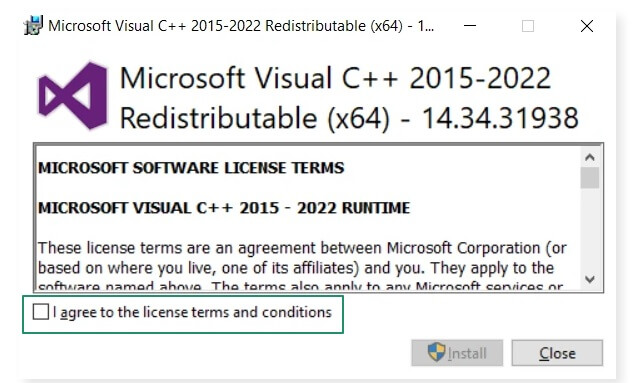
- Click the Install button.
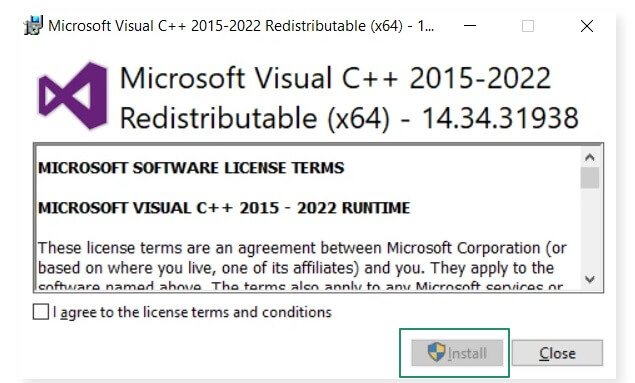
- Wait for the installation to complete.
- After the installation is complete, restart your computer.
- Lastly, after the computer restarts, search for and open the Control Panel, navigate to Programs and Features in the Control Panel, and then verify that the Microsoft Visual C Redistributable is listed in the programs.
What to Do If Microsoft Visual C Redistributable Installation Fails
If the Visual C Redistributable does not install on your computer or the installation fails, you can follow the steps below to fix the issue, including the Visual C++ 2015 Redistributable Setup Failed 0x80070666 error.
- Restart your computer to clear pending actions.
- Download Visual C Redistributable.
- Click the Start button, type cmd in the search bar, right-click the first search result, and then click Run as administrator.
- In the Administrator Command Prompt window, copy and paste the following command to change the Visual C Redistributable directory to the one containing the “vc_redist.x64.exe” file.
cd C:\Users\<Username>\Downloads\
Remember to replace “Downloads” with your actual directory and press Enter.
- Copy and paste the following command and then press Enter.
vc_redist.x64.exe /uninstall
Also know: How to Find a Windows Product Key in Windows 10 & 11
How to Uninstall Microsoft Visual C Redistributable Packages
While uninstalling the Visual C Redistributable is not a necessary or recommended action, below are the steps to do so if you must. Please be advised that uninstalling these redistributables may cause some games or applications that depend on them to break or stop functioning correctly. It is recommended to only proceed with uninstallation if absolutely necessary.
- First, right-click the Start button on the Taskbar and choose Apps and Features/Programs and Features.
- Locate and click on the Microsoft Visual C/C++ Redistributable that you wish to uninstall.
- Lastly, click on the Uninstall button and confirm the uninstallation.
That concludes our detailed Microsoft Visual C Redistributable download guide. We hope you found what you were looking for to ensure the smooth functioning of apps and games on your PC.
