

Asus offers a wide range of devices, including the best-in-class monitors, from basic to high-end screens. However, you need the right Asus monitor drivers to run any high or low-end monitor smoothly.
The driver software is a package of instructional files that helps the monitor and operating system (OS) of your computer to communicate with each other for stable device performance.
Without the correct, compatible, and up-to-date Asus display drivers, your monitor may not function properly, become dysfunctional, or cause fatal system issues. Hence, you must have the driver for your Asus monitor installed at all times.
In this article, we help you download, install, and update the Asus monitor drivers for Windows 10/11 in the safest and easiest driver downloader and driver updater methods. Let’s get started.
How to Download Asus Monitor Drivers and Install Them
You can download and install the Asus monitor driver or the Asus portable monitor driver from the official website or Microsoft Update Catalog (Microsoft’s repository of drivers, software, and updates), whichever way you find the most convenient. Here are both of these methods explained in detail.
Method 1: Download and install the Asus monitor driver from the official website
The device manufacturer’s official website is among the most reliable driver sources. If you know the specifications of your device (your monitor’s model) and the OS your computer runs, downloading and installing drivers from the official website is easy. To find the monitor model, you can check the back of your monitor. To find the OS, follow the path Windows key + I key > System > About and note the OS details. Once you have all the details, you can follow the steps below to download Windows 10/Windows 11 Asus monitor drivers and install them.
- Visit Asus’s official website.
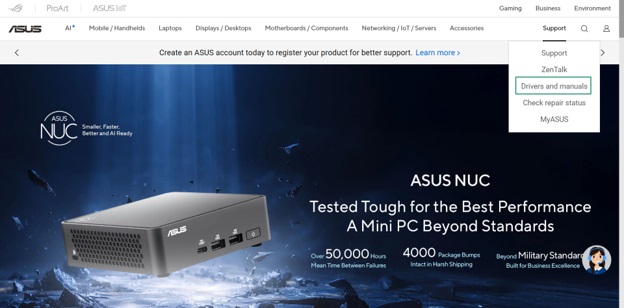
- Hover over the Support

- Click Drivers and manuals in the Support options.
- Type your monitor’s model or serial number in the search box.
- Select your monitor from the search results.
- Click Drivers & Tools.
- In the Driver & Tools tab, select your
- Click Download for the latest driver package.
- Save the ZIP file to a convenient location on your computer.
- Extract the downloaded ZIP file.
- Double-click the driver file.
- Follow the instructions that appear to install the driver.
- Lastly, restart your computer.
Also know: Fixed: A Device Which Does Not Exist Was Specified Windows
Method 2: Download the Asus monitor driver from Microsoft Update Catalog
Microsoft Update Catalog is Microsoft’s repository from which you can download essential drivers, software, and updates. Here is how to download and install the Asus display drivers from there.
- Visit Microsoft Update Catalog.
- Type Asus monitor drivers in the search bar and press

- Click the Download button for the latest driver for your OS.

- Next, click the link that appears.
- Save the driver file on your computer.
- Double-click the downloaded file and follow the instructions to install the driver.
- Lastly, restart your computer to complete the driver installation.
Downloading and installing the driver is not enough to ensure smooth device performance. You must also update the driver regularly.
How to Update Asus Monitor Drivers
You can update Windows 11/Windows 10 Asus monitor drivers through Device Manager, which is a built-in device and driver management tool, or Windows Update. Here is how.
Method 1: Use Device Manager to update Asus monitor drivers
Device Manager is a tool built into all Windows computers to ensure smooth device performance. It helps you perform various functions, such as driver download, installation, update, uninstallation, and reinstallation. The following are the steps to update your Asus monitor drivers for Windows 10/11 using the Device Manager.
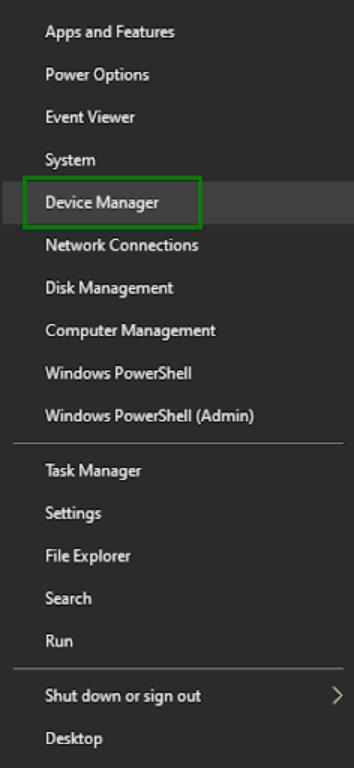
- Right-click the Start button.
- Click Device Manager in the menu that appears.
- In the Device Manager, double-click Display Adapters.
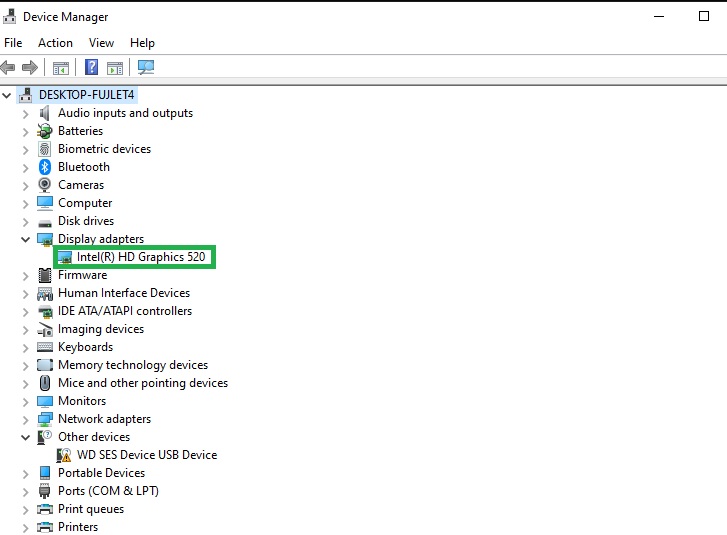
- Right-click your Asus monitor and then click Update Driver.
- Windows 11 users click Search automatically for drivers. Windows 10 users click Search automatically for updated driver software.
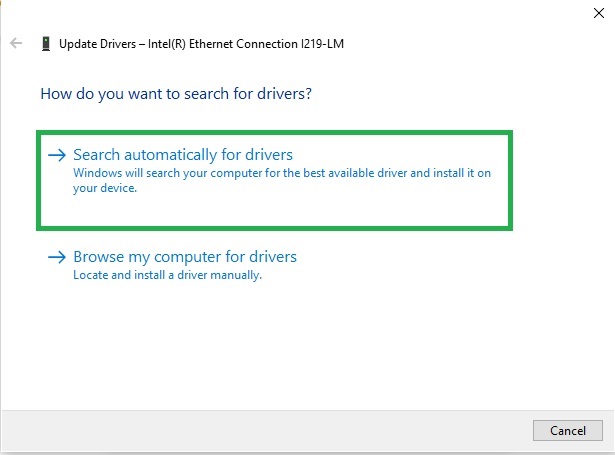
- Follow the instructions that appear to complete the driver download and installation.
- Lastly, restart your computer to complete the driver update.
Method 2: Update Asus monitor drivers with Windows Update
Windows updates fix system bugs, patch security gaps, download necessary drivers, and update outdated ones. Hence, here is how to update Windows to get the latest Windows 11/Windows 10 Asus monitor drivers.
- Click the Start button.
- Type check for updates in Windows search.
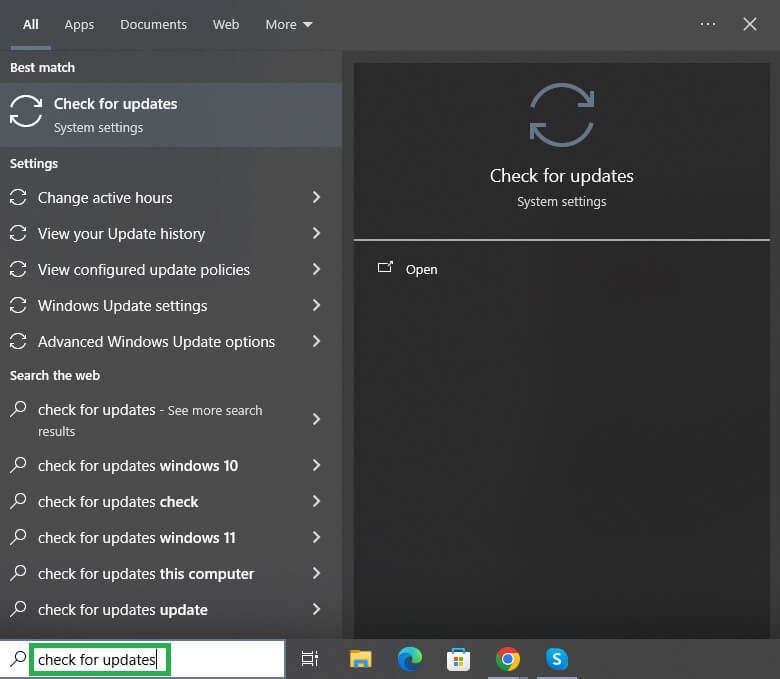
- Click Check for Updates in the search results.
- In Windows Updates, click Check for Updates.
- Click Download & Install to download and install all the available updates.
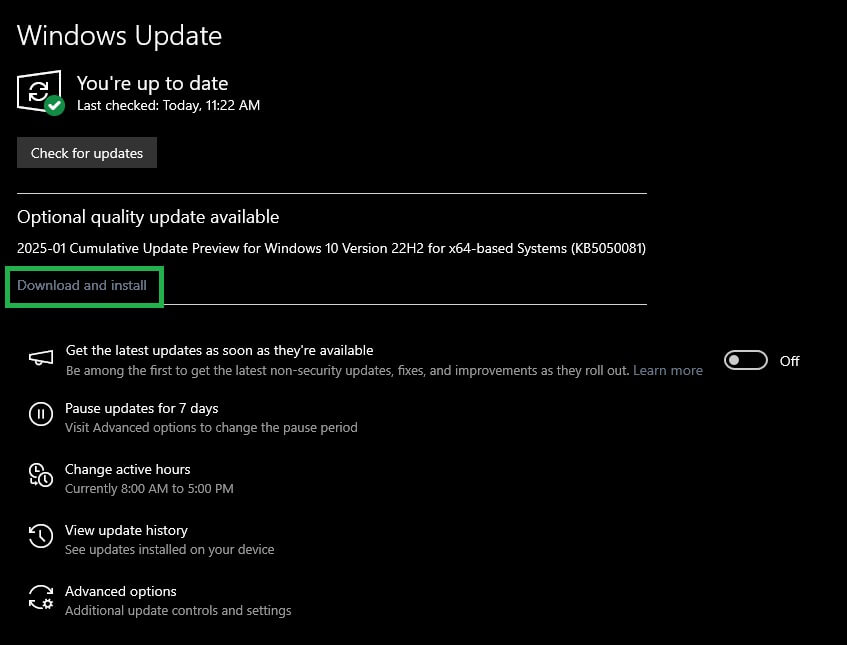
- Lastly, restart your computer to complete the Windows update.
With the methods above, you can easily download, install, and update the Asus monitor driver. Once your computer has the latest and compatible driver for your monitor, your device’s performance improves significantly. However, if you have any questions or concerns, you can write a comment in the comments section below.
Also know: How to Fix Destiny 2 Servers Not Available in Windows PC
Frequently Asked Questions
Q1. Do Asus monitors have drivers?
Yes, Asus monitors have drivers. Drivers are essential for making the most of your monitor and improving its functionality.
Q2. How to install a driver for an Asus monitor?
You can install an Asus monitor driver through the official website or Microsoft Update Catalog. This article describes both of these methods in detail.
Q3. Why is my Asus monitor not detected?
Outdated drivers are among the top reasons your Asus monitor is not detected. Hence, you can update the driver to solve the problem.
Q4. How to update Asus screen drivers?
You can download the Asus driver update and install it on Windows 10/11 via Device Manager or Windows Update, as explained in the guide above.

