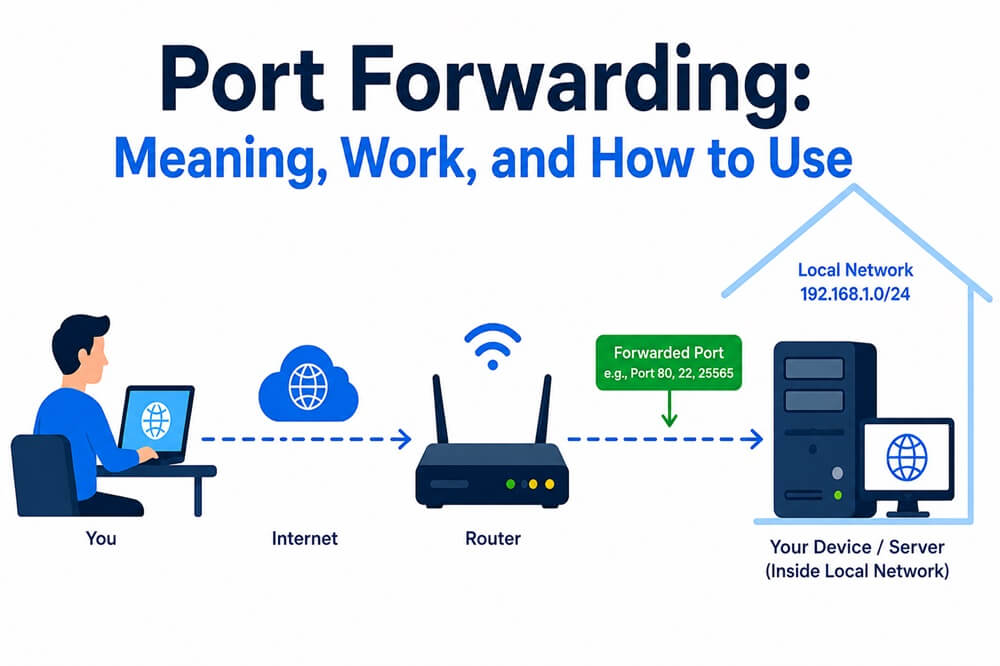
Port forwarding is a networking concept you may often come across, especially when checking the VPN features. Understanding port forwarding helps you choose the best VPN for your needs. Simply defined, port forwarding is a network configuration technique that lets your router send incoming internet traffic to a designated device on your local network.
The meaning of “port” in port forwarding is the channel that directs specific data to the correct applications on your network. It is a numbered door through which specific applications on your device send and receive information via the internet. When using a VPN, port forwarding functions as a local gatekeeper and blocks any incoming connections you did not ask for. Let’s help you understand the concept in greater detail in the next sections of this article.
What Is Port Forwarding
Port forwarding is the process through which communication requests are redirected from one port number and one address combination to another. To understand the concept simply, think of local IP addresses. Local IP addresses are assigned to every device connected to a router. Only the router knows these addresses, unlike the public IP addresses that DNS servers use to connect you to the correct server or the addresses your router uses to establish an internet connection.
Then, a port number comes into the picture. The port number directs the internet traffic to the correct software on your computer. For example, when you access a MySQL database, you are connecting to port 3306 on the server. Similarly, when you connect to a secure site that begins with https, you connect to port 443. The port forwarding process redirects the communication requests from a specific port number and address to another port number and address, allowing external devices to access a particular device or service within your private network.
For VPNs, port forwarding is an essential feature that allows direct connections to specific services or devices behind the VPN server. This feature helps you access resources that would otherwise be unreachable because of firewalls or network configurations. But why do you need port forwarding at all? Let’s understand that next.
Why Do You Need Port Forwarding
Helpful in webhook and API development, sharing local AI and LLM apps, site-to-site connectivity, remote management, and self-hosting and gaming, you need port forwarding for reasons such as:
- Viewing live camera feeds, monitoring your property, or checking camera recordings remotely.
- Accessing resources, such as media libraries, apps, or other services on your home server from outside the local network.
- Connecting to an office or home computer and controlling it remotely.
- Directing incoming visitors to the right server when running a website on your own hardware.
- Connecting to and managing smart home devices.
- Hosting multiplayer gaming sessions and running dedicated game servers.
- Maintaining direct device-to-device connections for improved reliability and performance of voice and video communication services.
To understand the need for VPN port forwarding, recap that VPN servers mask your IP address and encrypt your data to ensure privacy and security. However, this may result in limitations, for example, problems in accessing your local network devices or using specific applications that need direct connections. Port forwarding selectively forwards incoming connections to specific IP addresses or ports via the VPN tunnel, allowing you to access local network resources, host gaming servers, set up a home VPN to establish remote desktop connections, and use peer-to-peer applications.
Moreover, depending on the port forwarding purpose, it can be of three types, as explained in the next section.
What Are the Types of Port Forwarding
Local port forwarding, remote port forwarding, and dynamic port forwarding are the types of port forwarding. Local port forwarding bypasses firewalls or network restrictions. Remote port forwarding helps run a web server at home and lets internet users connect to it. Dynamic port forwarding allows secure access to various services via one connection.
- Local port forwarding: It forwards traffic from a local machine to another server, allowing you to access a remote service.
- Remote port forwarding: It lets someone outside the network access a specific service inside the local network.
- Dynamic port forwarding: Often used with VPNs, it creates a secure tunnel that handles multiple ports.
All these port forwarding types redirect traffic from one port to another port and are easy to set up.
Also know: Best Ways to Set Up a Secure VPN Connection on Windows
How to Set Up Port Forwarding
You can set up port forwarding using a VPN in five simple steps. Here is how.
- Select a VPN that offers the port forwarding feature. Not all VPNs support port forwarding. NordVPN, ExpressVPN, and Proton VPN are some of the best VPNs with port forwarding.
- After installing the VPN, open your router’s settings to find the port forwarding section. In the settings, create a rule to forward incoming connections to your device’s IP address or the services you wish to access behind the virtual private network.
- Configure the appropriate VPN settings to match the port forwarding rules you created on your router. Once you have set up port forwarding on your VPN, you can test it.
How to Check Port Forwarding
To test port forwarding, try to connect to a service or device outside the network. If the connection is successful, port forwarding is working correctly.
However, if you experience problems with VPN port forwarding, such as failed or dropped connections, port forwarding not working, firewall blocking incoming connections, IP address changes, or VPN provider restrictions, you can:
- Ensure your VPN and router settings are configured correctly, and the port forwarding rules match between the VPN client settings and the router.
- Check and adjust your firewall settings to permit incoming connections on the specified ports.
- Check and update the router firmware if it is outdated.
- Contact your VPN support if the issue persists.
Pro Tip: To optimize the VPN port forwarding for best performance, instead of common ports like 443 or 80, use less common ports, use a strong password for your router admin interface, enable Universal Plug and Play (UPnP), if it is available, to configure port forwarding automatically, monitor port forwarding settings regularly to detect discrepancies, and test port forwarding periodically to ensure all forwarded ports are accessible and open.
While port forwarding is an excellent way to manage network traffic and allow remote access, it is not completely risk-free. You must also consider the risks or disadvantages of port forwarding.
What Are the Port Forwarding Security Risks
Turning your device into an easy target for hackers, bypassing VPN security, exposing your internal devices to external access, sudden service disruptions, exposing your network structure, and data interception are the primary disadvantages or security risks of port forwarding.
- Port forwarding allows external traffic into the network, creating an entry point for attackers.
- If your device or application has not been updated or has security flaws, it can expose your network to attackers.
- When port forwarding is enabled, incoming traffic bypasses the secure VPN server, exposing your network to external sources and increasing the security risk.
- Port forwarding enables outside traffic to bypass the router’s defence mechanism, making your smart home devices, gaming console, or media server open to malicious actors.
- Service disruptions can occur if multiple devices use the same port, unnecessary slowdown occurs, or an overwhelmed network occurs if an open port attracts traffic without serving any purpose.
- Hackers can see the unencrypted traffic that flows through an open port. Hence, it becomes easy for them to intercept sensitive information, such as your personal data or login credentials, during transit.
Hopefully, this explains everything about port forwarding. Next, we answer a few commonly asked questions to clear up any confusion you may have.
Also know: Best Free VPN for Spotify
Frequently Asked Questions
Q1. Can I port forward without a router?
Yes, you can port forward without a router through reverse proxy tunnels. These tools create an outbound connection between your device and a public cloud server to route incoming internet traffic directly to your local port.
Q2. What is the alternative to port forwarding?
A VPN with port forwarding, SSH tunneling, and cloud-based remote access solutions is a reliable alternative to port forwarding.
Q3. Which is the best port forwarding VPN?
NordVPN and ExpressVPN are some of the best port forwarding VPNs. If you are searching for free options, you can try Proton VPN.
To recap the meaning of port forwarding, sometimes referred to as port mapping, port forwarding is a process that allows devices or services in private networks to connect with other private or public devices or services over the internet. If anything remains unclear, feel free to comment with your doubts or concerns.